WPTavern: #209 – Simon Pollard on Navigating the New Normal for WordPress Community and Events

Transcript

[00:00:19] Nathan Wrigley: Welcome to the Jukebox Podcast from WP Tavern. My name is Nathan Wrigley.

Jukebox is a podcast which is dedicated to all things WordPress. The people, the events, the plugins, the blocks, the themes, and in this case, trying to navigate the new normal for WordPress community and events.

If you’d like to subscribe to the podcast, you can do that by searching for WP Tavern in your podcast player of choice. Or by going to wptavern.com/feed/podcast, and you can copy that URL into most podcast players.

If you have a topic that you’d like us to feature on the podcast, I’m keen to hear from you and hopefully get you or your idea featured on the show. Head to wptavern.com/contact/jukebox and use the form there.

So on the podcast today we have Simon Pollard.

Simon has been building with WordPress for many years. Originally from Devon in England, he’s worked as a professional web developer across locations, eventually landing at Illustrate Digital, where he’s been for six years.

Simon’s not just a coder. He’s been deeply involved in the WordPress community, not only organising, but helping to grow the Bristol WordPress Meetup from a casual get together in a pub, to a thriving, officially backed event with dozens of regular attendees.

Like many in the WordPress ecosystem, Simon wears multiple hats. He’s a musician, a devoted dad, and an accidental community leader who found himself at the heart of local WordPress organising. But COVID-19 changed all that.

In today’s episode, Simon explains what happened to WordPress Meetups during and after the pandemic. How vibrant communities fizzled out. How hard it was to bring people back. And the new challenges of connecting when traditional social media platforms no longer bring everyone together.

Simon talks about his own journey, how he paused on events, shifted his social life to music, and struggled to hand the Meetup keys to new organisers. Eventually, a call from an old friend drew him back and he was faced with the new reality. Smaller groups, fractured channels, and the question of how to keep the in-person spirit of WordPress alive.

We get into the irreplaceable value of real life connection, the warmth in the room, and the need to rethink what gets people to in-person events now. Is it hybrid events? Perhaps it’s music? Something beyond pure WordPress talks? We discuss what’s been lost, what still matters, and what it might take to build the new era of WordPress community in a distracted, always connected, world.

If you’re curious about the future of WordPress Meetups, if you felt the ebb and flow of community during the past few years, or if you just want to know how to find your people again, this episode is for you.

If you’re interested in finding out more, you can find all of the links in the show notes by heading to wptavern.com/podcast, where you’ll find all the other episodes as well.

And so without further delay, I bring you. Simon Pollard.

I am joined on the podcast by Simon Pollard. Hello Simon.

[00:03:42] Simon Pollard: Hello Nathan.

[00:03:43] Nathan Wrigley: Very nice to chat. Simon and I have met for the first time, just sort of 10 minutes ago. We’ve had a little bit of a chat. And as is so often the case, Simon has a musical instrument in the background. I don’t know what that is, but there’s definitely a thing there. WordPressers often have musical instruments.

[00:03:57] Simon: There’s more behind me as well. And randomly, I’ll bring in another fact, so I’m in a very casual band of predominantly mid forties internet developing type people. And, yeah, we’re all the same, we all play instruments. And randomly we all, without being connected in any way, can work in the same one building in Bristol, which is co-working in individual offices and we all found out we’re all in the same building. And that wasn’t how we met.

[00:04:21] Nathan Wrigley: I think probably anybody listening to this has figured out by your accent that you’re from the UK. And you mentioned Bristol just there.

[00:04:27] Simon: Well, Brizzle if I’m going to be correct.

[00:04:29] Nathan Wrigley: Right at the top of the podcast, we typically ask the guests to just give us a little potted bio, a moment or two just telling us who you are. And as it’s a WordPress podcast, just give us your background with WordPress, I guess, as well.

[00:04:40] Simon: Yeah, well, I’m from Devon originally, which the English people will pick up on the accent potentially. I try to hide that away, but every now and again a little bit of farmer will come out and it’ll be oh, argh. And then, yeah, so I was born in Devon, moved away into to Cheltenham, been to Cardiff and then ended up in Bristol and worked at various places amongst all of them.

Bristol was where I finally got my kind of proper web job, an actual proper official web job. And the first company I started used WordPress as one of the platforms, and that’s from where I started off my kind of professional career. Moved around a few places since then as developers do, but always kind of staying in the area. And then currently, I am now at Illustrate Digital. Been there for six years, joined at the start of 2020, so that was an interesting progression, we’ll cover that later.

During my time in Bristol, it was someone else who originally raised the idea of a Meetup for of WordPress devs to kind of meet up and have a chat. So myself and a few others met up with this one guy called Henry, and we just met at the pub, sat around a table and had a chat and said, what are you doing? What do you need help with? What would we like to talk about?

And it kind of progressed from being, so we had a few more kind of casual chats, managed to grow. I think there was about six of us met originally and we kind of grew a bit and then said, oh, should we try doing like talks and making it a bit more official? So we progressed onto that. Struggled to find speakers, which I think is the story of absolutely every Meetup is find someone to talk. So I ended up doing a lot of talks myself, which I didn’t mind, but there was only so many times I can involve cats and WordPress together in the same thing.

And then it grew a bit. The key point for me is we took on someone who was a project manager by trade, who was also a developer. And they created a Trello board, and then suddenly we got organised. And I don’t know how, we kind of reached out, I remember now as I’ve just literally spoken to Jenny Wong who works over at Human Made, and she was assisting and she said, you know, is there anything I can do?

And she came over, I was working in Bath at the time. So she came over in person, back in the day when you met in person. Came over to Bath and we sat down and had a coffee and a chat, and she gave me all the tips and advice she could to kind of help build the Meetup and get it bigger and try and get things working.

She also helped us get official backing. So we got the WordPress official backing for the Meetup, which is brilliant because that gave us funds. That allowed us to start hiring venues which is brilliant. So all the worry of paying for kind of costs or anything for the venues got covered by WordPress. We still reached out for sponsors, and the sponsors gave us money for food. Food is obviously a good tool to get people in as well.

It just kind of grew. And I’m not sure what made it grow or how it grew, but it just kind of fed through. But this was back in the day when social media was less run by maniacs and you were happy to post on Twitter and Facebook and it kind of grew from that. I already had quite a good Twitter following, so I just kind of shouted there all the time and tried to pull in everybody and anyone who isn’t at all connected to the internet.

We went to Facebook, I got a friend of mine, was a bit of a social media guy, he set us up several kind of media accounts and added his advice. And then, yeah, just kind of moved on, and we were getting in a good crowd. Towards the end of 2019 into 2020 we were getting say 30, 40 people coming along to the Meetup, which is really impressive.

So we’d fill out a room, we’d get catering in, that would all get done. We had an account, we were that kind of organised, so we had an actual bank account to put our sponsorship money in. We were in profit at one point. So it was crazy. It was just going, yeah, going really well. Lovely kind of gathering, it was just a nice thing. We ran monthly. The organising team grew to about six or seven of us, because there was so much to do. So there’s plenty of us involved.

And yeah, it was going great, all going along lovely. 2020 came about and then suddenly COVID, and that was it. It kind of stopped because it had to, and none of us had the appetite to do the video side of things. We didn’t really have the technology, or the means, and it was just too much with everything else that was going on in the world. So it kind of petered out, and as did my involvement in the community, as much as in person involvement kind of faded out.

And I looked back and, yeah, the last meetup that I attended was in 2020, before just the other week when I’ve gone back, but like the last one was 2020 was the last, looking at my logs, the last Meetup I attended in person, which is quite sad to look back. But this all changed around. I’ve gone very off topic of what I actually do. I think I just went into this hole.

[00:08:49] Nathan Wrigley: Oh, no, it’s great because obviously what the listener doesn’t know is that you and I already know this is what we’re destined to talk about. So you’ve given us the full introduction. So I’ll just take over for a minute, if that’s all right? Because that’s really the case, I think you could map that across all of the WordPress Meetups within the UK.

So prior to COVID, things seemed to be going great guns. There were lots and lots happening. I don’t know the exact number, but there were many. I could pluck out of the air several, and probably, if you combined all of the numbers of those, it was hundreds of people, you know, getting out of their house, going to an event, sharing expertise but also, like you said, the social side of things.

And then this moment in time, this kind of sword of Damocles, if you like, suddenly that we didn’t know was there, dropped. Killed the whole thing overnight for good reason. You know, there was a really legitimate reason for everybody to stop moving around. But it seemed to have changed something for good.

Now what’s curious about that is I remember being in that COVID time, and I remember being utterly fed up and bored, and praying for the time when things would just return back to normal. And with great speed, actually, with the benefit of hindsight, looking back, that almost seems like I watched a COVID TV program. You know, it seems like, obviously I know it was real to me, but it all seems so in the rear view mirror now. It was almost like it was part of a fictional book or something like that.

But I fully expected that the minute all of the guards, and the protections, and the legislation came away, that I would just drop back into everything that I’d done before. And so for me, that’s what happened. I went immediately back to everything, you know, attending events, and all the other different things that I do in my own spare time that have got nothing to do with WordPress.

But the curious thing is, for me at least anyway, is that I appear to be different. You know, you’ve just gone back, within the last few weeks or so. What changed for you? Have you had the time to be introspective and think to yourself, why, Simon, did I not just resume what I was doing before?

[00:10:59] Simon: Yeah. So I mean it’s twofold for me. Yeah, I’ve been very reflective over the last kind of few weeks on this because I’m just reaching out again and seeing people. It’s like, I’ve not seen you in six years and it’s kind of crazy. Well I mean I spoke to them online and responded to comments here and there but, yeah, for me it was twofold.

So during the COVID times I was fortunate enough to have a baby, which changes everything again anyway. And that just became my focus. So whilst working full time and also having a child, that was my focus. The evenings, when I used to have the time to go to the Meetups and everything, in the evening, if I had any spare time, I would just prefer to sit. I didn’t want to do anything else. I didn’t have any energy. I was spent. I was enjoying a glorious moment of sitting, and if I was lucky watching a bit of TV. Yeah, it took it all out of me.

So I’ve put things on pause in that sense. I wasn’t really doing anything. Yeah, as you’ve mentioned the guitars and everything, used to go to gigs a lot as well, but that kind of went on hold. The music side ironically kicked off after. So that’s something that did come in first. So whilst I didn’t go to Meetups, some other people, when things got back reached out to me and said, oh, I’m running a band, do you fancy joining that? So that became my kind of social outlet instead. So my focus went on that, and playing in a band and just meeting up with them. So that was my social interaction.

Ironically, that was someone I knew through, not through Meetups but through events they used to run, I think it was Future of Web Design, or future of, one of those that was down in London. A lady called Michelle, who also has a child, used to live behind me, back in the day in Bristol. She’s moved away. And then she just dropped a message on one of the other social platforms, which I’ll go back to, and just said, oh, do you fancy joining a band, I do drums? I didn’t even know she played drums. Like, she’d been playing drums since kind of school and it just came out.

So that was my social outlet for a while. So I was doing that, and that was good because that was like once a month or so we’d just meet up and have a few hours. My wife could look after my little girl. And so that was my focus for a while and that kind of kept me content for a while moving forward. But I think, yeah, I lost the kind of the urge or the will. I didn’t really have the capacity to run the Meetup that I used to be involved with.

And there were a couple of failed attempts to hand it over. Several people came in and said, oh, I’d like to have a go at running that. So it’s brilliant. So I kind of was like, here’s the keys, off you go. Even still had the Trello board and everything that we had.

And one tried and failed. I think another one did and I just kind of left it. So I assumed nothing really was happening on that. Until recently, it was last year I believe when some of the original team, a lady called Janice who was there at the very first pub round table with me, I think we’ve been to every Meetup ever since. She moved into retirement because she was a web developer and was like, don’t want to stop doing things. And she liked the community and she thought, right, well, if no one’s going to get this up again, I’ll do it again. And she was in the team at the end as well, so she’s already had the experience. She pulled together some of the others of the team. So still another couple of people, Michael and Rob who used to kind of be managing as well, they’re back in it as well and they started bringing it back to life.

And so I kind of saw this last year, the Meetups kind of started filtering through. And because I’m still connected to a lot of these people I found out, trying to remember how it came, it might, would’ve been something like LinkedIn or somewhere, or even emailed and that kind of came through. And it was like, oh, I need to go along to that one time, I really need to go along. And even one of my friends was talking, I was like, brilliant, I’ll go and see him, I’ve not seen him in ages. And then I had an operation that put me out of action for a while.

So that came in, so even when I was just about ready to go. And then finally, turn around to this year and then, yeah, another good friend of mine Ross Wintle, who is a developer, who I think a lot of people hopefully will know, he works doing stuff for ACF in particular, which is why I harass him all the time. But I’ve known him for ages. He was talking, I was like, right, I’ve got to go along because he’s talking. I’ve not seen him in six years, and it’s a great chance to see everyone. And I was so glad I did.

A lot of it, whilst it was smaller, it was still just a lot of the same people. So I think I kind of took in that seeing the people didn’t really appreciate the size but still it was kind of nice. It still felt the same. It was still the nice, friendly atmosphere which you get with WordPress. I think you get that across the board. Not just in Meetups, but devs talk to other devs which you don’t necessarily get in other industries. I would happily tell another dev, for what I would call a rival, inverted commas, company, how to do something if they were stuck, which you wouldn’t necessarily get in other industries.

And that filters through, for me, for the Meetup side. The atmosphere, it’s just very friendly and welcoming. And talking at it is a joy, because you will never get heckled. No one’s going to do that. Unless it’s a friend of yours and they’re teasing you, because you know them.

It’s just such a nice kind of crowd, and that’s where I started doing talks. And I don’t think I would’ve ever done a talk if it wasn’t in front of such a nice crowd and you knew you could kind of do what you wanted. You can make a mistake and no one’s going to pick you up on it. And then a lot of the time they were just interested to hear what you had to say. It was just, yeah, nice.

So I think I’ve already talked myself into doing a talk again. So there’s a good reason to go back. So got to think about that. Yeah, and then I said, well, I used to have a network of people, so how do I reach out to that network of people that I used to do and pull them in? Like, how do I go, right, okay, we are doing all right here but as always, looking for people to talk? So how do I reach out to those people?

And that’s kind of the next point is, the next thing that changed was the social network seemed to almost turn evil in places like Twitter, which used to be a nice go to, and you’d message everyone. Everyone kind of jumped ship because, for good reason. No one seemed to jump ship into the same boat, and everyone was doing their own thing and there was no confined next to step of where you get in touch. And that’s where I’m currently at is, six years down the line, what’s the way to kind of network now on the internet with these people and get in touch with those I may have lost touch with?

[00:16:34] Nathan Wrigley: That’s so interesting. I’m going to unpack a lot of what you said there. I’ve been making my little notes as you’ve been going along, but there’s a few things there.

So the first thing is that it’s curious you, for reasons that you’ve explained very well, you know, the family being the easy one to grasp. You know, you had a very, a different life out the other side of COVID. And so the constraints around that, and the possibilities of socialising were diminished regardless.

I didn’t have that, and so I did sort of just drop back into where I was before. But what’s curious is that clearly isn’t the pattern. You know, we hear about, not just in the WordPress space, but lots of sort of social enterprises, clubs and things that were going on all over this country, kind of lost their way. They couldn’t attract the people back.

So something happened, I think, to us during that period of time. I don’t know if we just became habituated to sitting in more and, you know, more accustomed to watching the telly. I don’t know if they’re ingrained into us somehow, was this fear of the outside world. That’s really overdramatising it, but hopefully you can grasp what I mean. You know, just this idea that outside, bad, inside, good.

[00:17:44] Simon: It was two years of being told to stay inside. And whether of not, that’s going to sink in isn’t? At some point, without even thinking.

[00:17:50] Nathan Wrigley: Yeah. But then it just means that, when eventually the guardrails are pulled off, and obviously they weren’t just pulled off in one fell swoop. It was this sort of slow experimental phase, where you could be with a few people and then more people, and then that all got pulled back again, and then it all began again. Eventually, where we are now is you can do basically everything again. There’s no restrictions whatsoever.

But the community, the WordPress community in particular, I do wonder if we probably went into our screens a bit more than the typical person might do. Because, you know, we’re on our screens doing the work. Six o’clock maybe would’ve rolled by in the year 2018 and we would’ve closed the laptop, shut the computer down, and then done the other things. But then for a period of three or four years, we just carried on, on the screens and met on Zoom, or just carried on watching Netflix or whatever it may be. And then untangling all of that on the other side, proved hard, hard to do.

But then the bit that you just said, I’ve never thought about that. The social media, the shattering of social media where people have decided that this platform over there is not for them anymore. And, okay, I’m going to either discontinue using social media, or go to somewhere else and there really isn’t that, what do they call X? They used to call it the town square or something like that. And that’s a long time since that happened. But there’s now, there’s no replacement for that. There’s no one place you can go to. Everything’s shattered over multiple accounts. There’s no question there, but I don’t know if you wanted to respond to any of that.

[00:19:15] Simon: That’s where I am at the minute was I moved on, I tried different things and that’s randomly how I got the band notification was off one of those. But I can’t even remember now what platform that was. And I think I’ve closed the tab on my browser, and I’ve long since forgotten and not really gone back into it because it was a handful of people. And I spent a lot of time building up my Twitter following, and I just lost the urge to kind of do that all over again. And followed enough people for a while but then kind of lost the interest in that.

And, yeah, I don’t know, it’s weird. It’s just because there isn’t really anywhere that’s taken over that was, I mean Twitter was the key one for me. That was because I managed the account for the Meetup as well. So I could post on their behalf, but I could also kind of tie in and connect myself. I could retweet myself and retweet other people, and you could get those connections in place which is harder to do now.

That was my go-to, and then I don’t really know now, yeah, where to reach out. And even, one of the things raised at the Meetup I went to was, someone asked a question. It was like, well I’m not sure I can answer that for you immediately. We need to kind of sit down in front of a computer or something. But how do we communicate in between this and the next Meetup? How do we talk? What is the way to communicate now, that’s standard? You give out an email address or something that, I don’t know. Is that the way you communicate? I seemed very lost and almost forgotten how to socialise outside of actually being there in person. The in-betweens, which I’ve been doing for years and years, what’s the in-between way of talking?

[00:20:40] Nathan Wrigley: It’s strange that that’s a thing really, isn’t it? But it definitely is a thing. I suppose the piece of the jigsaw puzzle where it fits into this podcast is that if you are new to WordPress and you’ve never been to any of these events, and you’ve recently started going, a bit like you have done again. You go and you look at the event and you’ll think, okay, this is nice. Here’s the collection of people. But if you were to go pre 2019, so 2017, 2018 in particular, you were probably looking at the same event with, I don’t know, five times the number of people, 3, 4, 5, maybe even 10 times the number of people.

And so whatever that period was, whether it was COVID or a variety of other things, the numbers have dropped. And I think, whilst it’s not, I’m using air quotes at the moment, whilst it’s not necessary to have community for an open source CMS software project, certainly helps.

It helps that these people gather. It helps that they gain empathy. They sort of start to understand each other. It helps so that they feel a connection. You know, they’re going to join different teams because, oh, that person’s in that team and I know that person. It helps because it enables you to share knowledge and hopefully, instead of 10 people falling over the same problem, one person does, and shares their experience to the other nine. And yada, yada, yada. On it goes.

And it does trouble me that that component is now missing. It makes me think this isn’t good. And I don’t know what the answer is. I wish I had a magic wand that I could wave and bring it all back. Does it bother you? Do you feel that the community should still be important? Or can we just say, this is now where it is, just accept it. This is what we’ve got.

[00:22:26] Simon: Having dipped my toe back in properly into the community as it were, recently, it’s kind of reminiscing now what it was, and there’s still elements there of what it is and knowing people. It is almost networking. It’s kind of knowing those people, and someone knows someone. There’s a very kind of small world. Those relationships and people I used to speak to a lot that I didn’t so much, and it’s weird why that kind of stopped.

And I think, yeah, it’s definitely the kind of the sharing. And it’s particularly relevant I would say if you are a freelancer or work on your own or you are even part of a smaller team. But the networking helps you kind of expand out, and expand your team without it having to be in the company you’re working for. Because as I previously mentioned, the rare thing in the WordPress community is that a developer can speak to another developer about an issue for say, it might even be for a client, and they will work together to resolve it. Offering back is how it was, and I think it still is in some areas, which you wouldn’t say get in others. And I think that’s the community side of it that’s very different.

And I noticed that with the Meetup because I’ve been to other Meetups. We even did a collaboration Meetup as well. And the other ones I went to, it just didn’t feel the same kind of warmth. It felt very fixed. There was no kind of welcoming.

So the one thing that has always been relevant that the Bristol one, is we’ve got a welcoming team. So as soon as you step through the door there’s someone there. Get a little name badge as well. And if you’re new, they’ll ask a few questions and find out what you do. And what we always do is, oh, what do you do? Oh, I’m in project management. Ah, go and speak to so and so, they’re a project manager. Or, I’m looking for a developer. Or kind of find out what was their reasoning, and then direct them because we knew who was there.

That’s opposed to other ones where you go in and you almost kind of sign in and then you’re left to your own devices, and no one approaches you, and it just felt very kind of awkward. Whereas we would try and engage everybody, and we were lucky with the people who kind of organised it, with people like Janice who’s just a naturally approachable person and she will go out and talk to people. And we had that kind of mixture of people that, it just made it nice, and it was nice to go along. And you would go along for the people as much as you would for the talk itself.

I would go to talks which had absolutely no interest to me on paper, but I go along anyway because I wanted to see everybody. And then I ended up finding out that these talks were actually sometimes even more interesting when I thought they wouldn’t be any relevance to me. And it helps you kind of expand your kind of knowledge, and appreciate other elements, and other factors that you might not know about. Which in person is just a lot better and I think it’s more engaging as well. So you can kind of stare at a screen watching something. It isn’t quite as engaging as it is being in person.

And also, once you finish, it’s the debrief after that I really like. So when the talk is finished and everything’s wrapping up, you can go and speak to the talker and query something with them and go and speak to other people. And you kind of have that little social bit afterwards, and it’s all just nice and relaxed. And you don’t really get that on a video call because you can’t really go and mingle on a video call, because how do you go and talk to someone else. And it isn’t the same in person, it’s just a lot easier to kind of do that.

Yeah, how do you sell that for something that wasn’t there for a few years? It’s twofold. How do you bring in the people who used to come? And how do you introduce people who may have been born into never having that? The younger generation who lived through COVID, and didn’t really have that Meetup experience before it to know that this exists on the other side. And what would make it appeal to different kind of levels, really?

[00:25:43] Nathan Wrigley: So I’m not entirely sure, again, if we could rewind the clock. So this is going much, much further back. Let’s say the year 2003, something like that, when WordPress was really little. I don’t actually know the date of the first Meetup, but let’s imagine it was around there. And nobody had, in the WordPress community had ever thought to meet up.

If that just never had become a thing, I wonder how the project would’ve fared. I wonder if it would have been as successful. Because, you know, there were things like Skype and these platforms were coming along where you could do project management and things like that online. It feels like there was no, there would’ve been no inhibition to it being successful.

But I’m more or less willing to predict that it would not have been successful. I think the glue that binds the project together on some completely unquantifiable level is that community. And a certain proportion of that community in the past required the in-person meeting. You know, whether it be the WordCamp events, where they get on a plane or in a car and drive a long distance for a few days and lots of talks. Or whether it’s the more kind of informal monthly Meetup scenario, where it’s probably closer to home and a little bit quicker and one evening only, something like that.

I just have an intuition that the project wouldn’t have been successful. It was those people, and I think I’ve heard the word maven. Maven being this sort of description of somebody who is like a hyper connector. They’re really good at connecting the dots between people and saying, you should meet this person, and you should meet this person. A little bit how you described.

I think there’s some jigsaw puzzle of that going on. There’s some tapestry of these community members making it successful in a way we’ll never fully unpick. And now that that, in the year, so we’re recording this in March, 2026. Now that that seems to be somewhat in question, it then raises the question of, well, what does that mean for the future of the project as a whole?

My anticipation is that if we were to, let’s say nobody from this moment forward ever attended an event again, I think the project would not be as successful. There would be less development, there would be less interest in it. So I think it’s important that we do get these things back. But again, moving on to your point about how, that’s the tricky piece. You know, has life changed? Is the advent of everything online all the time, you know, so go back 10 years, there was no Netflix. Well, maybe there was, I don’t know. But the point is the entertainment that’s available through everybody’s TV now is so compelling, it’s kind of hard to fight against that.

But I don’t know how we get the young people in. I don’t know what it is about, you know, what the competition is. We’ve obviously got AI painted into the mix, and all of the interesting things going on there. So I don’t really, I’m not really pressing you for the answer.

[00:28:36] Simon: That’s fine. One of the reasons for joining is to kind of ask that question to the people listening and saying, has anyone else got that kind of magical wand and jigsaw missed piece? Has anyone got any ideas to kind of move forward with it? Because I say, I’m going to be looking, moving forward now, what I can do and how I can connect and get back in touch with people that I’ve not spoken to. I’ve already done it with a few people I hadn’t spoken to in a while. It’s like, oh, I’ve not spoken to you, oh, you’ve got a child as well. Oh, lovely. Those things you talk about which you just kind of left.

But yeah, I completely cut short on it and it’s just bizarre. But it is kind of coming back. It’s nice to know that whilst it’s quiet, it’s still there. It hasn’t died out, it’s just a little bit smaller than it was. But like you say, whether it can rebuild to where it was, or even partway to that is the query. I’d hope it can because I think it helps.

And the project itself, as you mentioned, WordPress wouldn’t exist without a community because it’s built by a community. It’s not built by a singular development company, and we wait for them to do it, you get involved. If you want to work with WordPress, you can do. There’s nothing stopping you getting involved. You can get in, you can be involved, you can be a tester, you can be a developer for it. There’s no like barrier to be involved in it, and it needs that community to keep it going. As you said, it wouldn’t probably have progressed to where it is without that community behind it.

And that community is still there in some context, but where are they in terms of, how can I to them and talk to them? Because there’s definitely people I want to reach out to again. And what’s the way to reach people these days? What’s the platform now? What’s the way to reach out to people? Where are people talking? Are they talking anymore? Or is it all just looking at TikTok? This is where I’m going to sound really old. Looking at like TikTok and just looking at short videos of things and that’s where. Or do people still communicate, and how? What’s the way to do that?

[00:30:20] Nathan Wrigley: I get what you’re saying by the way. I am of a certain age and things like, how do you even do TikTok? What even is that? I’m not entirely sure. But again, rewinding the clock, the website was the thing. That was the fulcrum of the internet really. It was, you know, suddenly you had this capacity to publish things online, and in order to do that, certainly prior to Facebook and MySpace and those platforms, you had your blog, you know, that was the way to do it.

You had to go through the process of setting it up. And the process of setting it up would pull back the curtain on, oh, so this is a bunch of files and a thing called a database. Right, okay. And that’s now on my computer, is it? Oh, right. And then that means I can mess up out with it. Oh, that’s interesting. And I can do this. And so this loop of curiosity gets created.

Whereas now, and again, this is where I’m going to sound old, the internet feels like a very different place. You know, you’ve got a billion platforms that you can just log into, no money down. There’s maybe some, you know, quid pro quo in terms of advertising or selling whatever it is that your attention can demand. And you can create your stuff over there, and it’s fine. And that platform has a reach of 3.6 billion people and yada yada, on you go.

So whether the incentives for younger people has changed because they just don’t see the need for having a website. Because that’s all been taken care of by these platforms that you log into. And, oh, just go over there, username, password, I’m all done. I think there’s something there.

[00:31:48] Simon: Yeah, I guess it’s the questions when you’re working on something. Because back in the day you would speak to someone, it would be someone’s response. If I had a question I would need someone to have answered that question on the internet. So developers will, of a certain age, will know Stack Overflow is kind of the go-to. That’s where we spent most of our time on the internet. You’d ask Stack overflow because you’d hope someone else had the same issue, and they responded or they’ve posted it, someone’s told them how to fix it or that kind of thing.

And I got to the point where even I started, I made it as a goal to hit a certain score on Stack Overflow. I was like, right, I’m going to hit a certain score, I’m going to respond, I’m going to answer questions, just because I want to feel like I’m giving back because it felt nice. I’d consumed so many answers from Stack Overflow, it felt rude not to give back. And the same thing for me I think with WordPress is I was consuming so much information I wanted to kind of give back, it was nice. And it made you feel, there was a nice thing in the community thing was, if I knew the answer to something and I could explain that to someone else and help them, it was a nice feeling, it was a nice thing to do.

It was like, I’ve learned this thing, and you are looking to do that thing, oh, I learned it, do it this way, this is how you do it. And that kind of helped me. So all of my Stack responses were WordPress. And it was nice to kind of respond to someone and them say, oh yeah, that’s great, and then several other people would like it. It was just a real nice, positive thing as well.

But now, again, there is a lot of reliance on AI coming forward, because it’s like, you ask AI and AI gives you the answer. And whilst AI consumes information from people, it doesn’t tell you who it consumed it from. So your answer is coming from the AI agent you are using, not from whoever’s actually come up with that answer. So you’ll get your responses, you don’t have to reach out to a person anymore so much as you did back in the day. And whether that’s a factor that the community isn’t needed because it’s being replaced. And you aren’t exposed to the community so you are not getting the answers through the community, you are getting it kind of channeled through an AI agent who’s consuming that.

So they’re doing all the stuff you used to do, and giving you the answers without you having gone into the community and found out that, oh, it was Joe Blogs who answered that question. And it might be that you reach out to them and say, actually, you knew this, do you know that? I’ve made connections through kind of these things as well, and if the answers are no longer attributed, and it’s like the AI agent is the one who’s responded, you don’t know who actually did that if that came through someone because it’s got this information.

[00:34:07] Nathan Wrigley: Yeah, it’s just the void provided the answer for you. Yeah, yeah.

[00:34:11] Simon: Exactly. And that’s the community’s kind of gone on that sense but, is that how people are kind of, that’s what they like or do people still enjoy asking others? I still like responding to others internally in my team. If one of my fellow devs has a question, I love to kind of speak, screen share, go and talk through together, because it’s a lot more kind of enjoyable than just asking the internet.

[00:34:32] Nathan Wrigley: Yeah. So I wonder if that’s the bear bones of what we need to sort of aspire to. So it’s to realise that there’s a proclivity to, so, okay, rewind a bit. To realise that the community has taken a hit. There’s no question that’s happened. But also to realise that there isn’t a panacea for this. There’s no red pill that we can take which is going to fix it over time.

It’s to recognise that there’s value in these things. It may be that there has been a dwindling in the audience of these things, but also that little avatar that you just painted of the person who’s curious about the code, but also has a desire to hang out, for the multitude of reasons that that could be, you know, they want to just hang out because that’s a nice thing to do, or they want to do networking, or they want to just make connections that they can chat to when they’re not in the room. To recognise that those people are still out there, and maybe those numbers are smaller.

Whilst you were talking also, it sort of occurred to me that maybe we’re just in flux. You know, nobody’s writing on cuneiform tablets anymore. Nobody’s using a stylist to write on papyrus anymore. Things change, you know, over time. And it may be that this is just the new normal, this is what we now have. I’m not entirely sure. But I kind of long for halcyon days. I’m looking back to those sort of 2018s, 2019s and thinking that’s the bar I’d like to have set. Whether or not that’s possible, I’m not sure.

[00:35:59] Simon: Yeah. It leads to me onto the level up on the Meetup was the WordCamps where it was a big kind of weekend event. And I was lucky enough to be involved. So I was the speakers organiser for the WordCamp that was in Bristol in 2019. Ironically booked my boss before I joined a company just as one of the speakers, and someone we employed as well I booked in for that.

And that was just, yeah, it got so big that we could actually run an entire weekend of stuff. But because the Meetups are now going down in size, I see there is still the appetite. It seems in America and other kind of countries around, but would there still be the appetite in England specifically, where we’re both based, for there to be a WordCamp? Would there be enough to warrant one of those? Or would it have to be very scaled back? Because I remember back in the day, I’ve been to like the London ones and you’ve got multiple tracks. Even the Bristol one had two separate tracks running. But now would it be something a bit more stripped back? Would it just be one track and a small kind of event? What scale would it be? Would there still be the interest?

[00:36:56] Nathan Wrigley: And also, does it have to be kind of mixed up with other things? Like, does it have to be part entertainment, part information, part hallway? Because again, I just wonder if that’s the diet that we’ve created ourselves with. Our always on culture, where entertainment is so readily available, I do wonder if, you know, we’ve got to just acknowledge that those things are of importance.

If you want to attract an audience of people, you’ve got to have the social afterwards, you’ve got to have the band, the live entertainment, the bits in between, the, I don’t know what that is, but just some aspect of gimmicks to make these events fun. Not just, okay, let’s go to a talk, watch the talk and then all go home.

[00:37:36] Simon: Yeah. There was always, I mean the thing I liked with a lot of these was there was the kind of a developer day or, that often preceded so you could get involved a bit more for those who wanted to. So there were kind of certain things. There were the socials as well that was always key to some, and that was just a nice way to kind of unwind afterwards. Because a lot of the time people would be traveling, so you didn’t want to go to the event and then go back to the hotel room and sit on your own. You could stay out and chat.

And as mentioned before, the community is a lovely community. So it’s people you want to hang out with because they’re nice people to hang out with. They’re all really lovely. And I’ve met a lot of really nice people at Meetups, at WordCamps. Just afterwards in particular and just chatting, chat about anything because after a while you get bored talking about WordPress, you’ll chat about whatever you want.

I mean if I get talking about music then I’m away. But it’s just, you build those relationships. And there are connections that I’ve made back, six, seven years ago that I’m still in touch now and I’m reaching out again and going, we lost that touch in between. So I’m kind of reaching out again and just catching up with people. It’s just nice to know like, oh, you’re still in the industry. What are you doing? What’s happened to you? And that kind of just disappeared almost. There wasn’t a way to stay in touch in between.

[00:38:42] Nathan Wrigley: The sort of glib comment that I made at the beginning about the fact that if we were to switch on the cameras on this podcast, we’d be able to see that Simon has a guitar in his background.

[00:38:51] Simon: I’ve got more if you look further up.

[00:38:52] Nathan Wrigley: Yeah, there’s many musical instruments there. But the point being though that there seems to be a, certainly from my perspective, doing these interviews on a, multiple a week. There’s a high correlation between musicians and WordPressers. And so I’m going to drop this bomb. Maybe that’s a channel for these events is to combine other things. Like combine cinema with a WordPress event. So, you know, there’s a track for watching films at the same time as there’s tracks for speakers, but there’s also live music over there. You know, I’m not suggesting we invite Coldplay or anything. But, you know, some local acts. Maybe some of the people that are involved in the event themselves, many of whom we know are musicians. It’s gimmicks again, but it’s fun.

[00:39:32] Simon: It’s a nice way, yeah, I mean it’s on our, so our band’s been going for a while and it’s still on our bucket list is to actually perform somewhere. We get together and rehearse and it’s one of my bucket list things is I would love to actually perform. Even if it’s just in a small pub in front of a handful of people and I know them all anyway, but just to kind of do that performance in front of things.

So that could be tied in. I wouldn’t be against kind of suggesting it to the rest of the guys and saying, there’s going to be this event and there’s all sorts of things taking place. There’ll be some technical talks or whatever and all these things. There’s also some music so we could perform. Definitely an idea. Yeah, like you said, there’s a lot of musicians around.

[00:40:07] Nathan Wrigley: Like a hybrid, arts meets technology kind of event.

[00:40:11] Simon: Yeah. There’s a lot of creativity. One of the best people I got speaking at the Bristol Meetup, bare in mind this is just a very small handful of people, a guy called Gavin Strange who works for Aardman. He is just amazing, and he’s done some brilliant speeches. I lucked out working with him on a community thing where we got together on a weekend and built websites in the space of a weekend. So thank God for WordPress, I basically built a site in, I don’t know, about five hours, we built a website from scratch.

He was working with us doing some animations and things and was such a positive, really great person. He works outside of work. He’s insane. He never stops. I reached out on a whim and said, do fancy doing a talk? And he goes, well, I don’t do WordPress. It doesn’t matter, it can be anything. And he came along and did a really good, positive, energetic talk. And that was my biggest coup was I got him to speak to us.

[00:40:57] Nathan Wrigley: And it was nothing to do with WordPress. Okay, that’s so interesting.

[00:41:00] Simon: Absolutely nothing. Nothing to do with WordPress. He just talked about, I can’t even remember, it’s a long time ago, but it was just interesting because it, just talking about what he does and a lot of kind of what he does outside of his working day and keeping busy and just.

[00:41:14] Nathan Wrigley: There’s a lot of overlap with soft skills and things, isn’t there? And to be honest with you, even just learning about the animation process and the tech, no doubt, involved in that. It’s kind of interesting. Okay. This is fascinating. This is going in an unexpected direction.

[00:41:27] Simon: That’s my thing now is maybe I can reach out to him again. And then through my other ways I’ve, I know someone who’s done a TED talk. That’s just probably a little level too much, but he’s a mountain biker. But I wonder, can I tie in that into somehow? And can I pull in that crowd that way? There’s all those kind of connections. It’s like, it doesn’t have to be. I think that’s the thing, we managed to get across that it doesn’t have to be WordPress. You can talk about anything if it relates to the internet, and then it might just aspire that that connects to a site that runs WordPress.

That’s how we kind of got a bigger crowd because we dabbled. We did do a technical focused one and it just, that was my thing. I really wanted to get techie and nerdy and it’s like, but you just cut down to too much of a niche and you’re cutting people out. It’s better to kind of have all sorts of things, and as I mentioned before, getting people to see a talk about something they might not think they’re interested in and realise actually it is very interesting and put across and try and get people in.

[00:42:17] Nathan Wrigley: Yeah. I think that’s the perfect place to sort of draw a line under this one. So what we’re saying is that WordPress events, Meetups in particular, I think we’re talking about mainly, they’re definitely going through a state of flux. We don’t necessarily have the answer, but we’ve definitely floated what the problem is. And there’s a few towards the end there, interesting ideas of ways to possibly make it more engaging to people who’ve, I don’t know, just lost interest, or have never come across WordPress.

So, oh, that’s fascinating. I really enjoyed that. Simon, where do people find you? Where are, you mentioned earlier how the entire world of social networking has been shattered.

[00:42:53] Simon: That’s my issue. Yeah, well, I mean you can find me on illustrate.digital. I’ve got to give a slight plug out to the company I work for. We are a WordPress agency. We do loads of stuff for WordPress. At the minute I seem to be living on LinkedIn. I got addicted to a game on there, and then I kept kind of pulling back. That’s my kind of way to reach out at the minute so you can find me there. I think, yeah, otherwise I don’t really use the other socials. I am on Facebook, if you find me, good luck. But otherwise I think LinkedIn is the way to get me initially. But if you’ve got an example and say, ah, you should join this platform, do reach out and let me know, I’m happy to have a look.

[00:43:22] Nathan Wrigley: Thank you. I will make sure that anybody listening to this is able to find that. If you go to wptavern.com, search for the episode with Simon Pollard in, you’ll be able to probably scroll to the bottom of the show notes and there’ll be links to his LinkedIn.

So Simon Pollard, that was a really curious and interesting chat. Thank you for chatting to me today. I appreciate it.

[00:43:41] Simon: Thank you very much Nathan.

On the podcast today we have Simon Pollard.

Simon has been building with WordPress for many years. Originally from Devon in England, he’s worked as a professional web developer across locations, eventually landing at Illustrate Digital, where he’s been for six years. Simon’s not just a coder, he’s been deeply involved in the WordPress community, not only organising, but helping to grow the Bristol WordPress Meetup from a casual get-together in a pub to a thriving, officially-backed event with dozens of regular attendees.

Like many in the WordPress ecosystem, Simon wears multiple hats. He’s a musician, a devoted dad, and an accidental community leader who found himself at the heart of local WordPress organising. But COVID-19 changed all that. In today’s episode, Simon explains what happened to WordPress Meetups during and after the pandemic, how vibrant communities fizzled out, how hard it was to bring people back, and the new challenges of connecting when traditional social media platforms no longer bring everyone together.

Simon talks about his own journey, how he paused on events, shifted his social life to music, and struggled to hand the Meetup keys to new organisers. Eventually, a call from old friends drew him back, and he was faced with the new reality, smaller groups, fractured channels, and the question of how to keep the in-person spirit of WordPress alive.

We get into the irreplaceable value of real-life connection, the ‘warmth in the room,’ and the need to rethink what gets people to in-person events now. Is it hybrid events? Perhaps it’s music? Something beyond pure WordPress talks? We discuss what’s been lost, what still matters, and what it might take to build the next era of WordPress community in a distracted, always-connected world.

If you’re curious about the future of WordPress Meetups, if you’ve felt the ebb and flow of community during the past few years, or if you just want to know how to find your people again, this episode is for you.

Useful links

Simon on LinkedIn

Illustrate Digital

Bristol WordPress Meetup Group

How to Turn Your Membership Site into an App (The Easy Way)

It’s a common misconception that you need to hire a developer or spend $10,000+ to build an app. You can actually turn your membership website into a branded app in under three hours and on a much smaller budget.

Forcing your members to repeatedly log in through a phone browser is a major cause of churn. An app removes this friction by keeping users logged in right on their home screens.

In this guide, I’ll show you exactly how to get your membership site onto your members’ phones using MemberPress AppKit, all without writing a single line of code.

Turn Your Membership Site into an App (The Easy Way)

💡Quick Answer: How to Turn Your Membership Site into an App

You can turn your WordPress membership site into a mobile app using MemberPress AppKit, without hiring developers or writing code.

It automatically converts your existing site into iOS and Android apps, so your members can access content through an app instead of a browser.

Why Turn Your Membership Site into an App?

A membership app makes it easier for members to come back, stay logged in, and engage with your content more often.

When your site lives as an app on a member’s phone, a lot of small frustrations disappear. There’s no browser to open, no tabs to find, and no repeated logins. Everything feels faster, simpler, and more natural to use.

That’s where the real benefits show up:

  • Your site lives on your members’ home screens, so it’s always visible and easy to open.
  • Members stay logged in, which removes one of the biggest barriers to repeat visits.
  • Content opens faster than a mobile browser, especially for lessons and videos.
  • Push notifications help you bring members back at the right time.
  • Courses, videos, and community areas feel more focused inside an app.

Because of this smoother experience, apps generally see higher engagement than mobile websites.

If your members already use their phones to watch lessons, read posts, or check updates, an app simply removes friction. This makes it easier for them to stay involved.

How Much Does Creating a Membership App Actually Cost?

Creating a membership app is more affordable and accessible than many site owners expect. You don’t always need to hire developers or build everything from scratch.

When most site owners think about mobile apps, they imagine high costs, long timelines, and technical headaches.

But there are several options available, which make launching your own branded app much simpler. Here’s a quick breakdown of the main approaches and what they typically cost:

Option Process Typical Cost
Hiring developers High complexity, ongoing maintenance $10,000–$50,000+ upfront
App agencies Long timelines, rigid processes $5,000–$20,000+
Generic app builders Manual content setup, constant syncing $50–$300/month
MemberPress AppKit Turns your existing site into iOS & Android apps, real-time content sync, push notifications, in-app payments, no-code setup $1,746.50/year (including hosting, membership site, and app)

Compared to other options, MemberPress AppKit is much faster, easier, and more affordable—all without losing functionality or control of your site.

Why I Recommend MemberPress AppKit
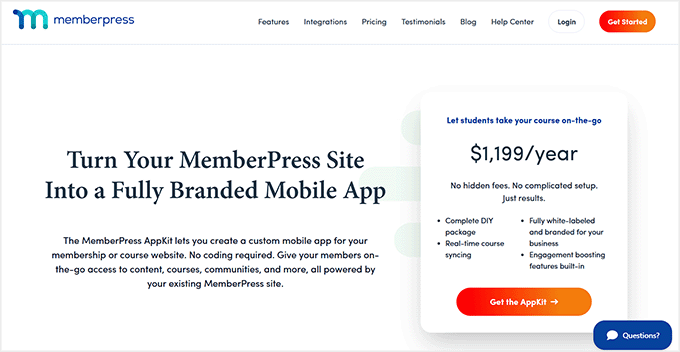
MemberPress AppKit Homepage

As you can see in the table above, MemberPress AppKit stands out from the rest.

It turns your existing MemberPress membership site into a fully branded mobile app without rebuilding anything, hiring developers, or dealing with complex setup.

Plus, it supports both iOS and Android. Your content, members, and payments stay exactly the same, you just get a mobile-friendly app experience.

Here are just some of the reasons why I recommend MemberPress AppKit:

  • Fully branded Mobile App: Launch your own iOS and Android app that reflects your brand.
  • Real-time Content Syncing: Courses, lessons, and membership rules stay perfectly up to date.
  • Built-In Push Notifications: Remind members about new lessons, events, or updates.
  • In-App Payments: One-tap enrollment boosts conversions by 3–5x.
  • No-Code Setup: Everything you need to publish in the App Store and Google Play.

For most membership site owners, this is the easiest and most cost-effective way to launch a real mobile app. And it delivers a smooth experience.

Is Creating a Membership App the Right Path for You?

A membership app can be highly beneficial, but it’s not required for every site.

To make this easier to see at a glance, I’ve created this table. It shows when an app makes sense and when you might want to wait:

An App Makes Sense If You May Want to Wait If
Members regularly access your content on mobile. Your membership site is brand new.
You offer courses, lessons, or video content. You have very few active members.
You want to boost retention and engagement. Your content is mostly text-based and works fine on mobile web.
Members have specifically asked for an app experience. Your budget is extremely tight right now.

The good news is you don’t have to decide forever. You can always start with a mobile-friendly website and add a membership app later as your site grows and your members’ needs evolve.

MemberPress AppKit Setup: What You Need & How Much It Costs

Before I show you how to turn your MemberPress membership site into a mobile app, let’s make sure you’ve got everything ready.

I’ve put together a quick checklist so you know exactly what you need:

  • Reliable WordPress Hosting – Your site needs fast, stable hosting. I recommend Rapyd Cloud, which is optimized for membership sites. It starts at around $29/month.
  • MemberPress Plugin – Required to run your membership site and manage subscriptions. Pricing starts at $199.50/year.
  • MemberPress AppKit Subscription – Turns your existing site into a fully branded mobile app, starting at around $1,199/year.
  • Apple Developer Account – Needed to publish your iOS app, costs about $99/year.
  • Google Play Developer Account – Needed to publish your Android app, starting at $25 one-time.

If you haven’t built your membership site yet, I suggest taking a look at our ultimate guide. It covers creating a membership site in WordPress.

If your site is already live with MemberPress, your main new costs will just be the AppKit subscription and developer accounts.

Compared to hiring a developer to build a custom app, this is a much faster and more affordable way to get a professional app.

Step-by-Step: How to Turn Your Membership Site into an App

Now that you clearly understand the costs and requirements for building a membership app, it’s time to dive into the actual setup.

Expert Tip: While the setup is no-code, you still need to generate API keys from your developer accounts. It is a one-time process, but I recommend setting aside an hour to get everything configured correctly.

With MemberPress AppKit, the process itself usually takes around 2–3 hours. This includes connecting your site, customizing your app, and preparing it for launch.

It’s worth noting early on that submitting your app to the Apple App Store and Google Play can take extra time.

Apple’s review process can take a few days, while Google’s is typically faster.

💡 Pro Tip: Since first-time app submissions sometimes require minor tweaks before approval, I highly recommend waiting until your app is officially approved by both stores before announcing a hard launch date to your members.

In the steps below, I’ll guide you through turning your MemberPress membership site into a polished, fully branded mobile app. Your members can access it anytime, anywhere.

Step 1: Install and Activate the MemberPress AppKit Plugin

To get started, you’ll first need to purchase MemberPress AppKit from the MemberPress website. Once you’ve completed your purchase, you’ll be able to download the AppKit plugin.

After that, the next step is to install and activate it on your WordPress site.

This plugin is what connects your membership site to your mobile app. It handles everything behind the scenes, including syncing your content, members, and settings automatically.

If you’re not familiar with the process, you can follow our guide on how to install a WordPress plugin, which walks through every step.

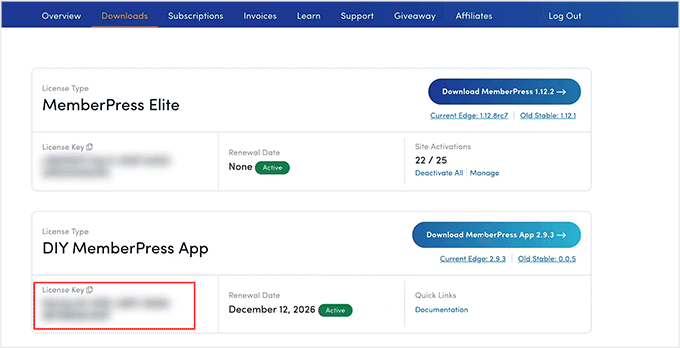
Upon activation, you’ll need to connect it to your website using a license key. You can find your license key by logging into your MemberPress account and opening the AppKit subscription details.

Copy the MemberPress AppKit license key

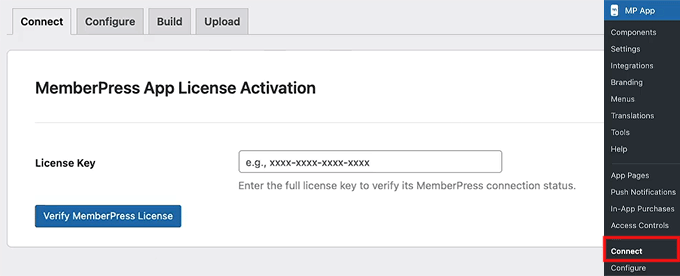
Next, go to MP AppKit » Connect in your WordPress dashboard. Paste your license key into the field and click the ‘Connect’ button.

After a few seconds, you should see a confirmation message letting you know the connection was successful.

Add MemberPress AppKit license key in WordPress

From here, you’re ready to start configuring your app and preparing it for the build and publishing process.

Step 2: Configure Your iOS Settings (Apple Developer Account)

Now that your MemberPress AppKit is connected to your site, it’s time to get your iOS settings ready. This helps your app appear on the Apple App Store.

The first thing you’ll need is an Apple Developer account. Setting this up is simpler than it sounds.

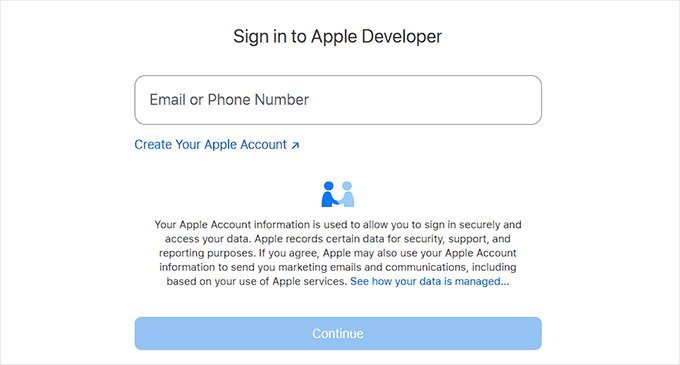
You just sign up at Apple’s developer site, fill in some basic personal and contact information, and pay the annual fee. Apple usually takes a day or two to approve your account, so it’s a good idea to get this started early.

Create Apple Developer account

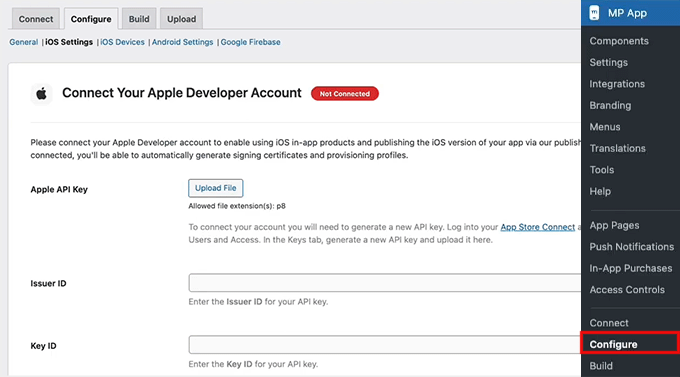
Once your Apple Developer account is ready, go to your WordPress dashboard and head over to MP AppKit » Configure » iOS Settings. This is where you’ll connect your Apple account to MemberPress AppKit.

Start by pasting in your Key ID and Issuer ID, then upload the API key you generated in App Store Connect.

📍Security Warning: Treat this API key like a highly sensitive password. Keep it strictly confidential and never share it with unverified third parties to protect your app’s security.

This connection lets MemberPress AppKit handle all the complicated stuff behind the scenes. This includes creating certificates, syncing your app content, and managing in-app subscriptions.

Connect the Apple Developer account with MemberPress AppKit

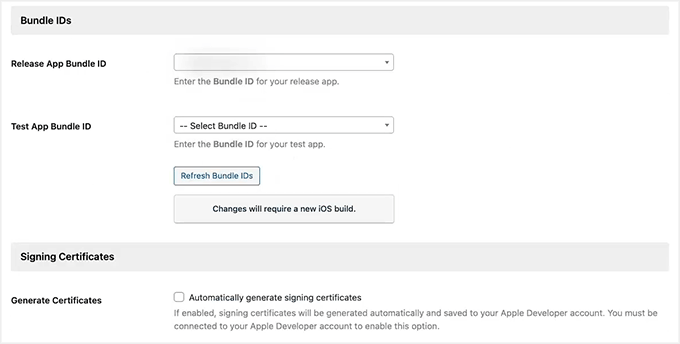
There are a few key pieces of information you’ll need to add here, and each one has a very important role:

  • Bundle IDs – These give your app a unique identity on iOS. Think of it as your app’s passport.
  • Signing Certificates – These act as your digital signature, proving the app was created by you.
  • Provisioning Profiles – These tell Apple which devices can install your app for testing.
  • App ID and App-Specific Shared Secret – These make in-app purchases and membership subscriptions work smoothly.
Add bundle IDs in MemberPress AppKit

I know this might feel like a lot at first, but I promise it’s mostly copy-paste work once you have your Apple account ready.

We’ve gone through the full process in detail in our tutorial on turning a WordPress site into an app. The steps for MemberPress AppKit are very similar, so you can follow that guide and feel confident you’re doing everything correctly.

Step 3: Configure Android Settings (Google Developer Account)

Once your Apple setup is done, it’s time to connect your Android settings so your app can be published on the Google Play Store. I know this sounds technical, but if you follow along carefully, it’s easier than it looks.

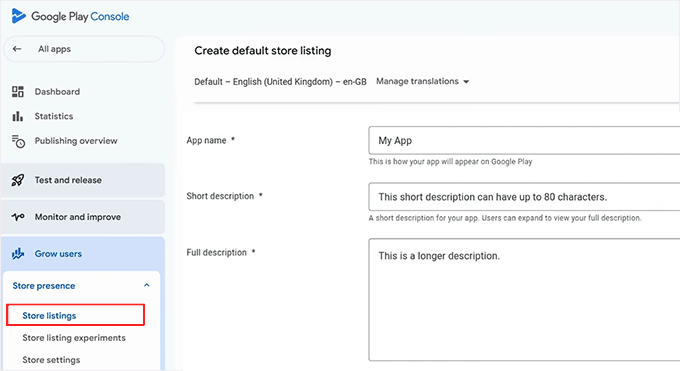
Start by creating a Google Developer Account, which lets you publish apps and manage updates. Then, the next step is to create your app in Google Play Console.

Here, you’ll give your app a name, select a default language, and choose whether it’s free or paid.

For most memberships, I recommend setting it to free, since monetization is usually handled through MemberPress itself.

Configure app details and create an app

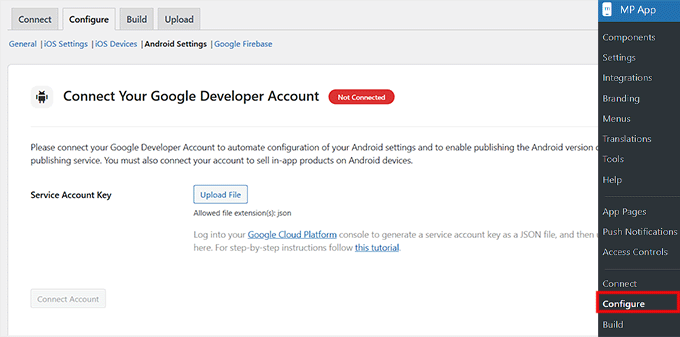
Next, head over to MP AppKit » Configure » Android Settings. Here, you’ll need to upload the Service Account key you generated in Google Cloud.

📍Security Warning: Just like your Apple API key, this file gives access to your app’s infrastructure. Keep it completely secure and do not share it.

This connects your Google Developer account to MemberPress AppKit so your app can sync content, users, and in-app purchases automatically.

Connect Google Developer account with MemberPress AppKit

There are a few key items you’ll need to set up at this stage:

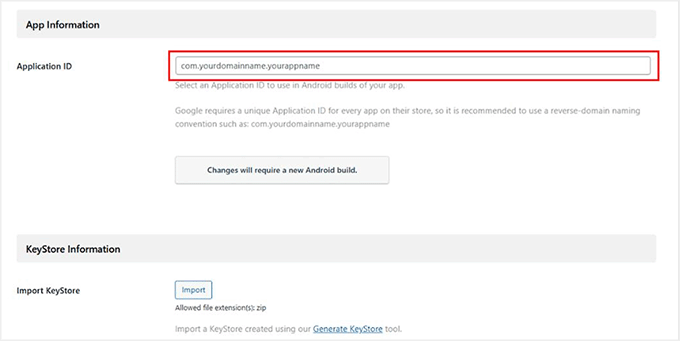
  • Application ID – Think of this as your app’s unique ID in the Google Play Store. It needs to follow a reverse-domain format. This usually means taking your website domain extension and name, and adding a suffix (for example, if your website is mywebsite.com, your ID could be com.mywebsite.app).
  • KeyStore certificate – This is like a digital signature for your app, which ensures Google recognizes you as the owner for future updates. You can generate this directly in MP AppKit.
Add Keystore information in MemberPress AppKit

You can see our guide on turning your site into an app for more setup tips.

Once your Service Account key, Application ID, and KeyStore are all configured, your Android account is fully connected.

Step 4: Configure Firebase to Send Push Notifications With Your App

One of the best ways to keep your members coming back is through push notifications. These little nudges let your community know about new posts, messages, or events.

To make this work on both iOS and Android, you’ll need to integrate your MemberPress AppKit with Google Firebase. This is a free Google tool that handles real-time notifications.

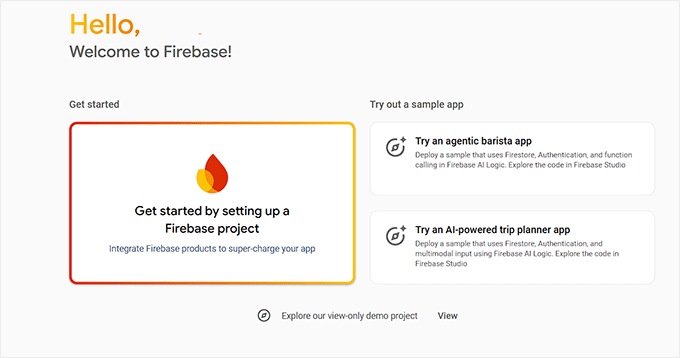
To get started, create a Firebase project, which is basically the foundation for all your push notifications. Head over to the Firebase Console and click the ‘Get started by setting up a Firebase project’ button.

Create a project in Firebase console

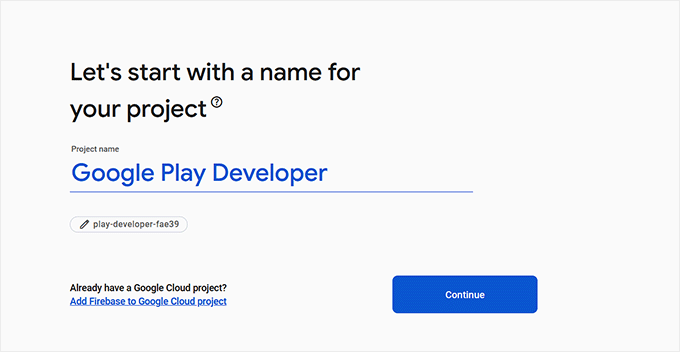
Give it a name that matches your app so you can easily recognize it later.

You’ll also have the option to enable Google Analytics, which can be handy if you want to track app activity, but it’s optional.

Add a name for your Firebase project

Next, you need a Firebase Service Account Key. This key acts like a digital passport, allowing WordPress to securely send push notifications through Firebase.

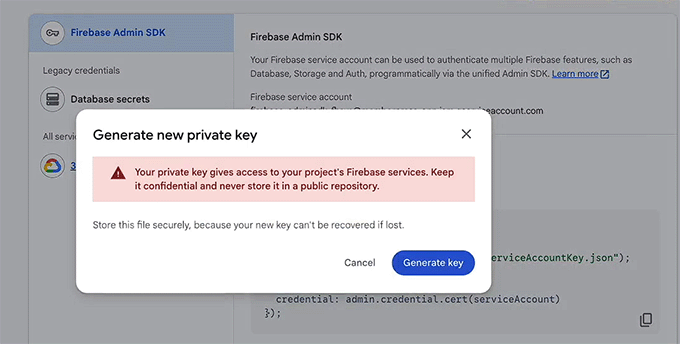
To get it, go to your project in Firebase, then navigate to Project Settings » Service accounts. Scroll down to the ‘Firebase Admin SDK’ section, click ‘Generate new private key’.

Then, download the JSON file. I know downloading a “JSON file” sounds highly technical, but don’t worry! There is absolutely no coding required.

You are simply downloading this file from Google to upload it into WordPress in the next step. Make sure to store it in a safe place — this file can only be downloaded once.

Generate an admin key for MemberPress AppKit in Firebase

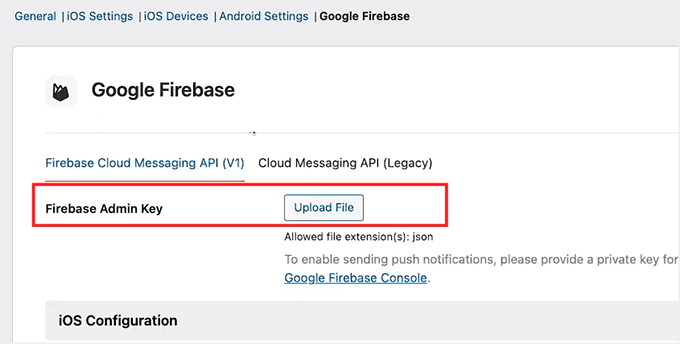
After that, head back to your WordPress dashboard under MP AppKit » Configure » Google Firebase and upload the file under ‘Firebase Admin Key.’

This step connects Firebase to your MemberPress AppKit.

Add Firebase admin key in MemberPress AppKit

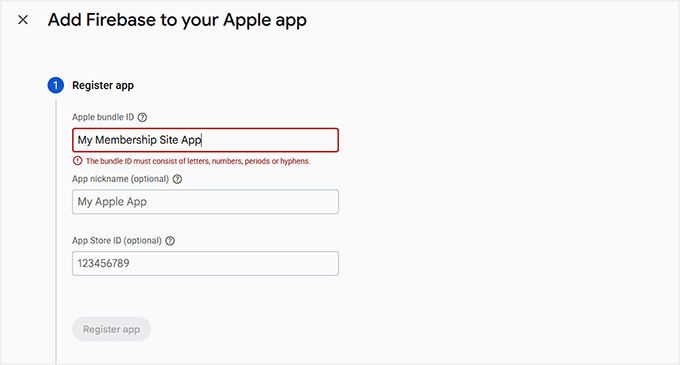
Next, you’ll register your mobile apps in Firebase. You’ll need to create four apps in total: a main app and a test version for both iOS and Android.

Make sure the Bundle IDs for iOS and Application IDs for Android match exactly what you used in your developer accounts. They also need to match your MemberPress AppKit settings.

For iOS, you’ll also need to upload your APN (Apple Push Notification) authentication key from Apple so push notifications can reach Apple devices.

Add iOS and Android apps in Firebase Console

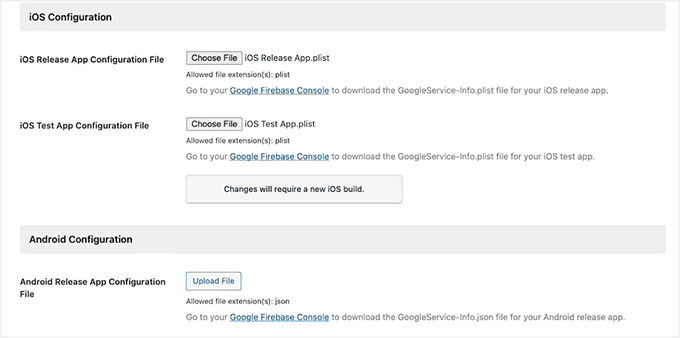
After registering all apps, download the configuration files. This includes the .plist file for iOS and the .json file for Android, along with their test versions.

Then, go back to WordPress and upload all four files under the Google Firebase settings. Click Save Changes,’ and you’re done.

Add android and iOS apps Firebase file in MemberPress AppKit

Your app is now connected to Firebase, and push notifications can start reaching your members on both iOS and Android.

💡 Pro Tip: Double-check that your Bundle IDs and Application IDs match exactly. Any mismatch can cause errors and prevent push notifications from working.

We cover this process in more detail in our guide on how I turned a WordPress site into a mobile app. You can follow it for extra guidance.

Step 5: Set Up Key Features in MemberPress AppKit

Now that your app is connected and Firebase is ready, it’s time to configure the features that make your app really engaging for your members.

From push notifications to sharing and feedback, these settings help keep your community active and returning to your app.

1. Enable Push Notifications

Push notifications are one of the easiest ways to keep members engaged. They pop up in real-time on members’ devices when there’s a new post, message, or membership update.

Turning notifications on helps members remember to return to your app. When members open your app for the first time, their phone will ask for permission to send these alerts.

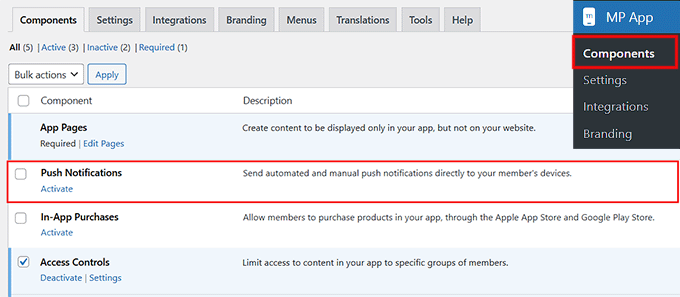
To enable, go to the MP AppKit » Components page and click the ‘Activate’ link for push notifications.

Enable push notifications component in MemberPress AppKit

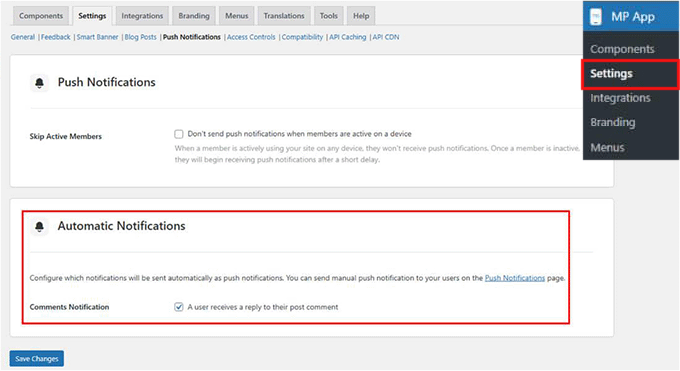
Next, I suggest configuring the ‘Automated Notification Types.’ These are triggered by specific actions—like a new post or membership update—so you don’t have to send notifications manually.

Head over to MP AppKit » Settings » Push Notifications, select the automatic notifications you want active, and click the ‘Save Changes’ button.

Select automatic notifications in MemberPress AppKit

Only enabled notifications will appear in members’ app settings, and they can choose which ones to receive.

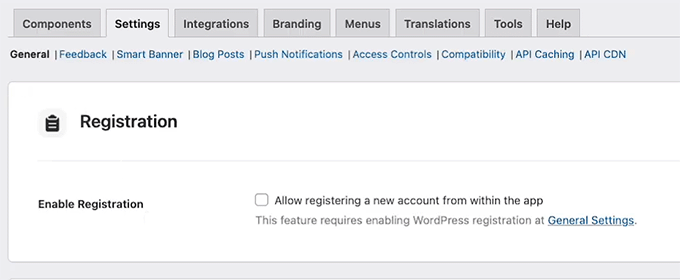
2. Enable User Registration

I highly recommend letting new members register directly from your app. It makes onboarding super easy and reduces admin work.

Go to MP AppKit » Settings » General and scroll down to the ‘Registration’ section. Then, check the ‘Allow registering a new account from within the app’ option.

Enable user registration in MemberPress AppKit

Once you’re done, click the ‘Save Changes’ button to store your settings.

3. Configure Delete Account Settings

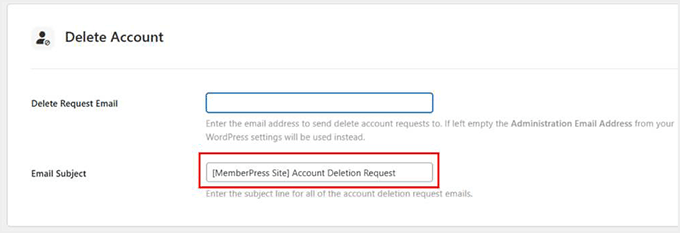
It’s important to give members control over their accounts. The Delete Account feature allows them to request account deletion while keeping you compliant with privacy rules.

To add this feature, go to the MP AppKit » Settings » Feedback page and scroll to the ‘Delete Account’ section.

Here, enter the email address where deletion requests should be sent. I suggest also customizing the email subject line so these requests are easy to spot.

Allow account deletion with your app with MemberPress AppKit

If you leave the email blank, the system will use your WordPress Administration Email. Upon making the changes, just click the ‘Save Changes’ button.

4. Enable Report a Bug and Send Us Feedback Features

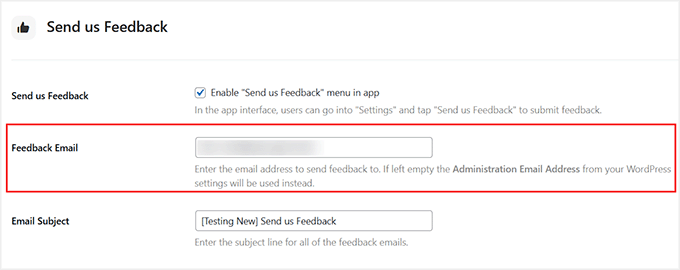
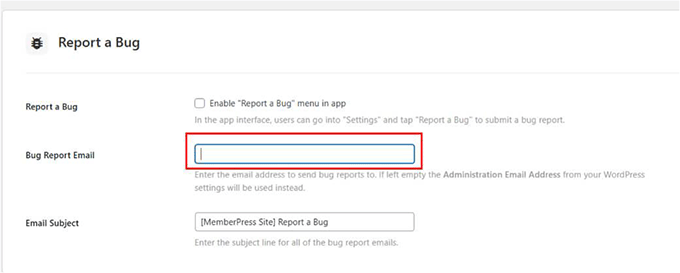
Getting user feedback is super important. The Report a Bug feature lets members submit issues with screenshots or videos, while Send Us Feedback collects general suggestions.

I recommend enabling both by going to MP AppKit » Settings » Feedback and checking the boxes for ‘Report a Bug’ and ‘Send Us Feedback’ options.

Enable Send Us Feedback option in MemberPress AppKit

Then, enter the email addresses for submissions, and optionally add default subject lines.

Members can submit directly through the app. Each submission will include device info, app version, and platform details to help you troubleshoot efficiently.

Add the Report a Bug feature in MemberPress AppKit
5. Enable Share and Related Posts

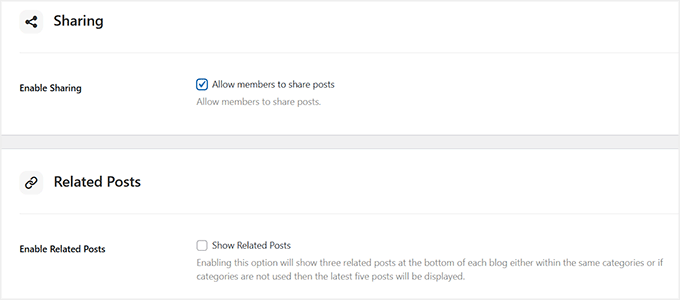
Sharing content helps your members become promoters, and showing related posts keeps them reading longer. I usually recommend turning on both.

For this, head over to MP AppKit » Settings » Blog Posts. Under the ‘Bookmarking’ section, check the ‘Enable Sharing’ and ‘Enable Related Posts’ options. Then, click ‘Save Changes.’

Enable social sharing in app with MemberPress AppKit

Now, in the app, members can tap the share icon to copy the post link. They can also share via apps like WhatsApp, Facebook, or Messages. Related posts will show at the bottom of articles, keeping members engaged.

6. Configure Smart Banner

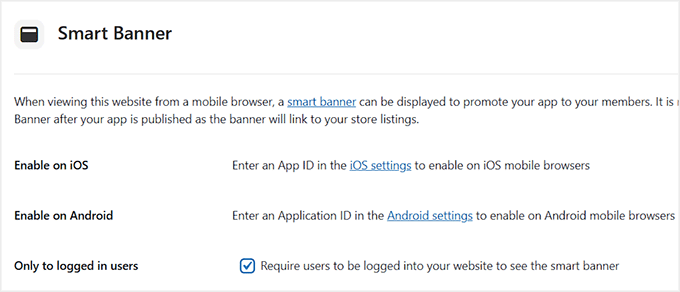
The Smart Banner is another handy feature. It prompts visitors who land on your website via a mobile browser (like Safari or Chrome on their smartphones). They will be prompted to either download your app or open it if they already have it installed.

Note that this banner won’t appear for users visiting your site on a desktop computer.

This works well for boosting app installs because it targets users who are already engaged with your site. This makes them more likely to try the app.

To enable it, go to the MP AppKit » Settings » Smart Banner page and check the boxes for iOS and/or Android.

Enable smart banners in MemberPress AppKit

After that, simply click the ‘Save Changes’ button to store your settings.

7. Configure Default Restricted Message

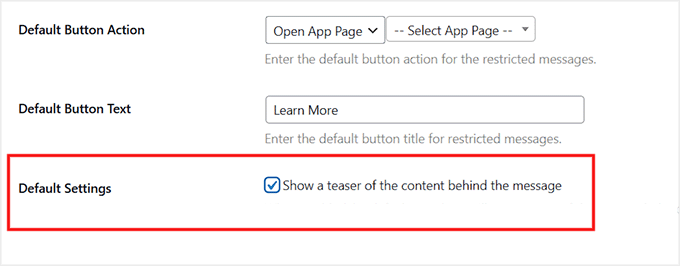
Finally, I suggest customizing your Default Restricted Message. This appears when members try to access content they don’t have permission for. A clear message with a call-to-action improves member experience.

Go to MP AppKit » Settings » Access Controls, scroll to ‘Default Restricted Message’ section, and enter a title and explanatory text.

You can also select a button action (like opening a membership page or a custom app page). Plus, you can enable content teasers to give members a preview of restricted content.

Add default restricted message in MemberPress AppKit

Click ‘Save Changes’ when done.

Step 6: Configuring App Branding in MemberPress AppKit

Custom visuals make your app feel professional and on-brand. I recommend taking time to configure logos, splash screens, icons, and colors carefully. These help reinforce your identity and make the app feel polished.

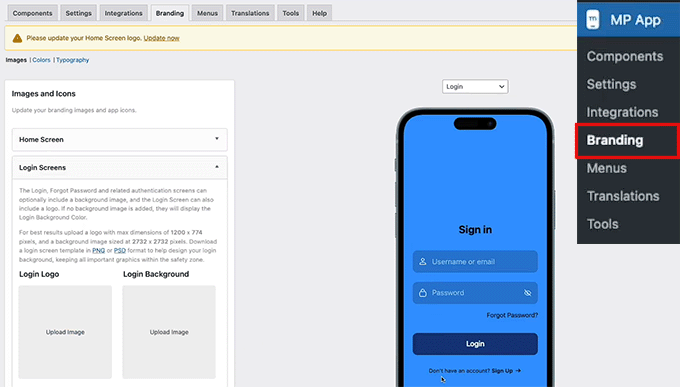
Start by adding your app’s logos and images. Head to the MP AppKit » Branding » Images page from the WordPress dashboard.

This is where you can upload logos for your home screen, login screen, registration screen, and launch screen. I suggest using the same logos and colors as your website so your members instantly recognize your brand.

Add image icons for your app in MemberPress AppKit

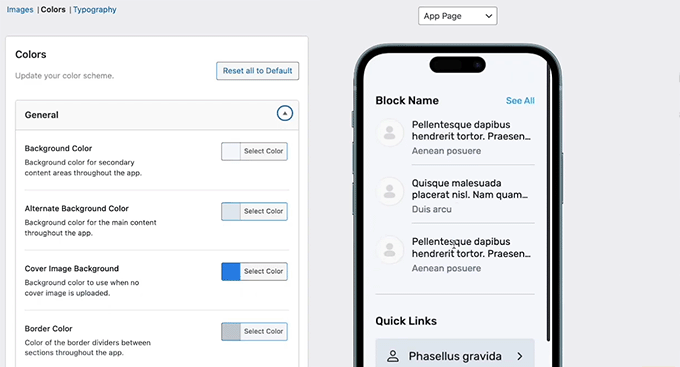
Next, customize your app colors by switching to the ‘Colors’ tab from the top.

This controls backgrounds, buttons, navigation bars, text, and interactive elements. I recommend picking a color palette that complements your logos and helps with readability.

Set general colors for your backgrounds, accents, borders, and image placeholders. Once you are done, make sure to click ‘Save Changes’ to store your settings.

Configure app colors in MemberPress AppKit

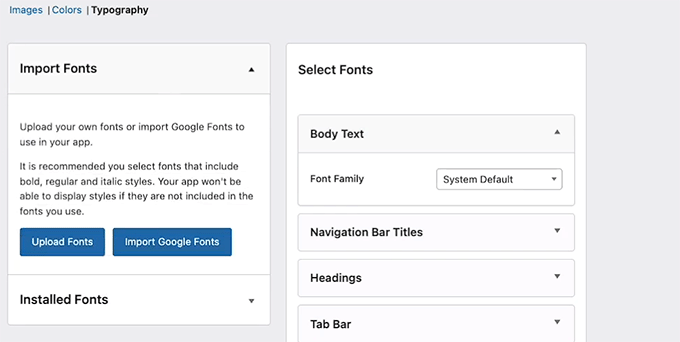
Typography is important for readability and brand identity. Switch to the ‘Typography’ tab to import Google Fonts or upload your own custom fonts.

Choose fonts that are clear on mobile screens and match your brand style.

Configure your app's typography in MemberPress AppKit

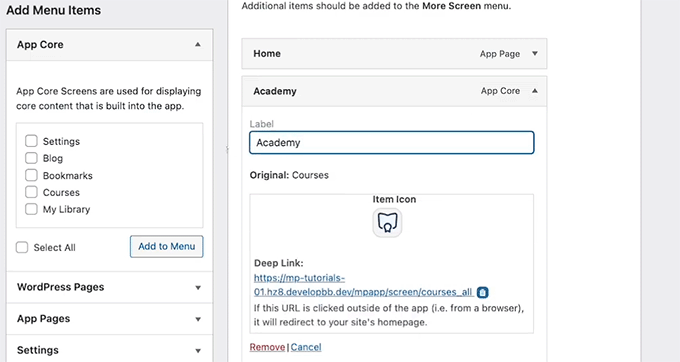
Other than that, you can personalize your navigation icons in the Tab Bar and More Screen menus by going to MP AppKit » Menu » Tab Bar. I suggest using simple, branded icons that are easy to recognize.

Upload your icons, crop them so they fit neatly, and repeat the process for the More Screen menu. Then, click the ‘Save Changes’ button.

Add image icons for your tab bar in MemberPress AppKit

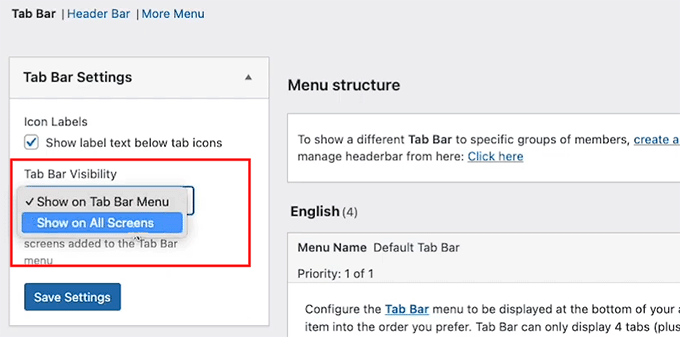
Finally, decide where your navigation appears by configuring the ‘Tab Bar visibility’ from the left column.

You can choose to show the navigation on all screens, which keeps it always accessible. Or, show it only on main menu screens for a cleaner, distraction-free experience.

You should test both options to see what works best for your app content.

Configure tab bar visibility in MemberPress AppKit
Step 7: Configure the App Homepage

After your app branding is set up, the next thing you should focus on is the app homepage. This is the first screen members see right after logging in. It plays a big role in how easy your app feels to use.

A well-designed homepage helps members find what they need faster, reinforces your branding, and highlights the actions you want them to take.

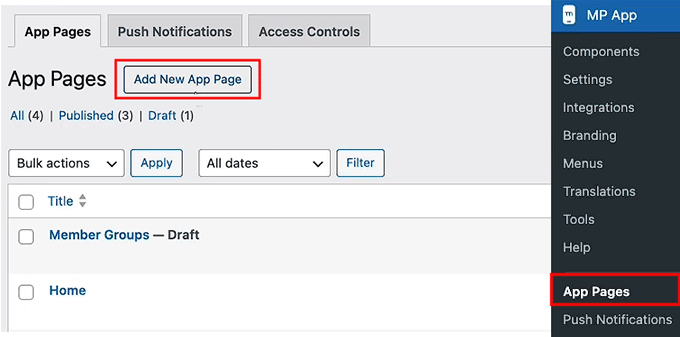
To get started, go to MP AppKit » App Pages in your WordPress dashboard. This is where you create custom screens for your app. Click the ‘Add New App Page’ button.

Create an app page in MemberPress AppKit

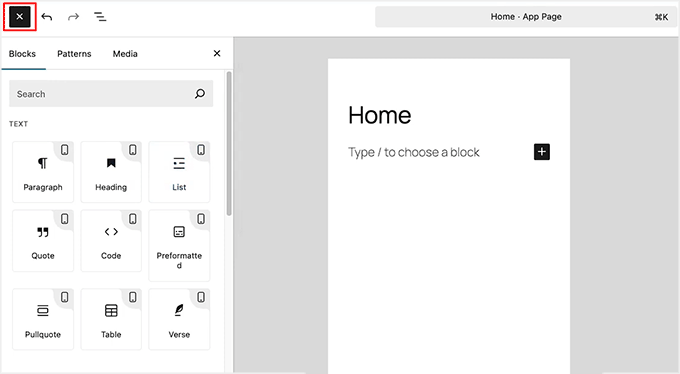
Then give your page a simple title like “Home.”

I recommend keeping the name short and clear because you’ll use it later when adding the page to your app’s navigation.

Once the page is created, you can start designing it using familiar Gutenberg blocks. Just click the ‘+’ icon to add blocks.

Use blocks to customize app pages in MemberPress AppKit

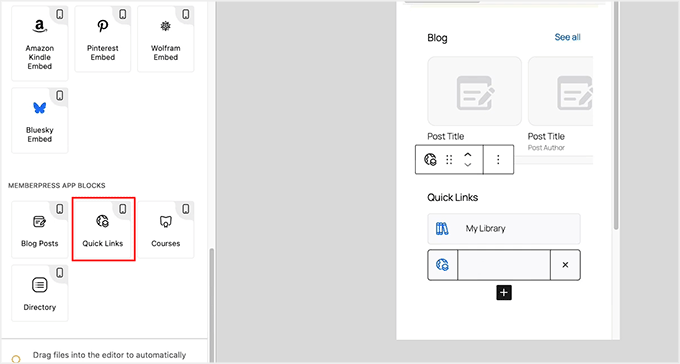
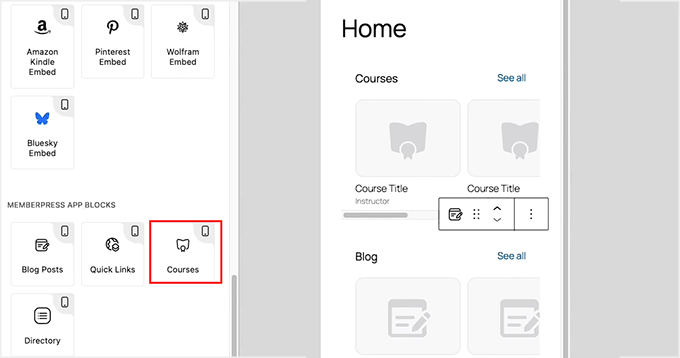
One of the most useful options here is the ‘Quick Link’ block. It lets you point members to key areas like courses, activity, or important resources.

I suggest adding the links members are most likely to tap right after logging in, so they don’t have to dig through menus.

Add Quick Links block to MemberPress AppKit

If your app includes courses, you can add the ‘Courses’ app block to the homepage. This block displays courses in a carousel that feels very natural on mobile.

Members can tap a course to view details or choose “See All” to browse the full list.

You can rename the block title and adjust colors. You can also decide whether to show courses automatically using filters or manually select specific ones.

Add the Courses block in MemberPress AppKit

After your homepage layout is ready, click the ‘Publish’ button to make the page live. You can now repeat the process to create other pages for your app.

Step 8: Build and Test Your Mobile App

Now that everything is set up, this is the point where you actually turn your membership site into a working mobile app.

To get started, head over to the MP AppKit » Build in your WordPress dashboard and click the ‘Request Build’ button.

Click the Request Build button in MemberPress AppKit

Next, select your platforms — iOS, Android, or both — and choose ‘Test App’ and ‘Release App’ as your build types.

This will generate four versions: a test and a release build for both iOS and Android.

The Test App version is what you can install on your devices to check functionality. For Android, you can usually install this immediately using a QR code. For iOS devices, you will need to use Apple’s TestFlight app to install your test build.

It’s perfect for checking how your app looks, testing features, and making sure everything works before submission.

The Release App is the one you’ll use to upload to the Apple App Store and Google Play Store. After selecting your platforms and build types, click ‘Next Step’ and review the build summary.

Select platforms and Build Type in MemberPress AppKit

Make sure your site configuration, menus, branding, and customizations are correct.

Once everything looks good, click ‘Send Build Request.’

Click Send Build Request button in MemberPress AppKit

Your build request will now go to MemberPress’ cloud build system. When the build is complete, the status will change to Completed.

At that point, click the ‘Install Test App’ button to generate a QR code. Scan it with your device to download and install the test version.

Install the test version of the app in MemberPress AppKit
🔍 Things to Check in Your Test App (Before Submitting to App Stores)

Upon installing the test version of the app on your phone, here are a few important things I recommend checking.

This will make sure everything is working properly:

  • Can you log in and register a new account?
  • Do menus, content, and core features load correctly?
  • Are push notifications working?
  • Does the branding match your settings — logo, colors, and app icon?
  • Is navigation smooth with no broken links or missing icons?

Testing now helps you catch issues early, so your app store submission goes smoothly.

Step 9: Submit Your App to the App Stores

Once you’re happy with the test version, the next step is submitting your app to the app stores.

From the Build page, switch to the ‘Release Apps’ tab. Here, you will see the Release App versions of both your iOS and Android apps listed together.

For Android, expand the ‘Submit for Publishing’ dropdown and select the ‘Upload to Google Play Console’ option.

For iOS, expand the ‘Submit for Publishing’ dropdown and choose ‘Upload to App Store Connect.’ This will start the upload process for each platform, sending your app builds directly to the stores.

Submit apps for publication in MemberPress AppKit

Before uploading, make sure you’ve prepared everything the app stores require, including your app description, screenshots, and keywords.

These items will appear on your public app listing and play a major role in helping users discover your app through search.

In the Google Play Console, you can enter this information by going to your dashboard, selecting your app, and opening the ‘Store Listing’ section.

Add app details in Google Play Console

For App Store Connect, simply go to ‘My Apps’ and select your app.

Here, you can upload your screenshots, add your app description, and include relevant keywords to improve visibility in the App Store search results.

Upload screenshots in App Store Connect

After submission, your app will go through a review process. This usually takes a few days, but it can vary. If your app isn’t approved on the first try, don’t worry — Apple and Google provide feedback so you can fix issues and resubmit.

Once approved, your app will be live for users to download.

💡 Bonus Tip: Keep Your App Updated

Publishing your app isn’t a one-time process. Minor updates, like adding new posts, courses, or content, will automatically sync to your MemberPress AppKit app.

However, bigger changes — such as enabling new MemberPress features, updating APIs, or changing your app branding — require generating a new build. You must then resubmit it to the app stores.

I recommend doing this regularly to keep your app stable. This also makes sure everything works smoothly and your users always have the best experience.

Frequently Asked Questions About Creating an App for a Membership Site

Have questions about turning your MemberPress site into a mobile app? You’re not alone.

Below, I’ve answered the most common questions to help you get your iOS and Android apps up and running quickly and smoothly.

Do I need to know how to code to create an app for a membership site?

No, you don’t need any coding skills. MemberPress AppKit handles the app creation for iOS and Android automatically using your WordPress site settings.

Will members need new accounts for their membership app?

No, your existing members can use the same accounts they already have on your WordPress membership site.

Can I use Stripe or PayPal in my app?

While MemberPress easily uses Stripe and PayPal on your website, mobile apps have different rules.

If you are selling digital goods (like memberships or online courses) inside the app, Apple and Google strictly require you to use their native In-App Purchase (IAP) systems. This is to comply with their guidelines.

Keep in mind that both platforms take a percentage cut (usually 15% to 30%) of these in-app sales.

What if the app for my membership site gets rejected?

App store rejections are common and usually easy to fix. Most issues happen because of metadata, screenshots, or minor policy requirements. You can fix these quickly and resubmit for approval.

Will content update automatically in my app?

Yes, updates like new posts, courses, or membership content will sync automatically with your app without needing a new build.

Can I send push notifications for free?

Yes, by using Google Firebase, you can send unlimited push notifications to your app users at no extra cost. This is one of the best ways to improve engagement without increasing your monthly budget.

By following these steps, you’ve turned your membership site into a professional mobile app that lives right on your members’ home screens. This not only makes your content more accessible but also helps build a more engaged community.

To grow your site even further, you should check out our tutorial on how much it costs to start a membership site. Also see our top picks for the best WordPress membership plugins.

If you liked this article, then please subscribe to our YouTube Channel for WordPress video tutorials. You can also find us on Twitter and Facebook.

The post How to Turn Your Membership Site into an App (The Easy Way) first appeared on WPBeginner.

HeroPress: I Don’t Have It All Figured Out. I Show Up Anyway.

Pull Quote: You don’t have to wait until you feel ready. You just have to show up.

Here is Indira reading her own story aloud.

My background is in Quality Assurance: testing features, observing behaviour, and making sure things work as expected. For a long time, I believed open source contribution mostly meant writing code. Since I wasn’t a developer, I saw myself more as someone learning from the community than contributing to it.

Finding My Place

I grew up in Akola, a small town a few hours from Nagpur. Our school computer lab had one computer for every ten or twelve students. I was shy, so I rarely got a turn at the keyboard. Most of the time I watched from a few rows back, trying to understand what the others were doing.

I went on to complete a diploma and then a degree in Computer Science. Fast forward to today: I started a role at rtCamp, a company where contributing to open source is part of the culture rather than something people do in their spare time. Even then, I was too reluctant to ask whether there was a place for a QA engineer in the WordPress contributor community.

Then, at a Contributor Day, I watched a few people test a feature, open tickets, report bugs, and translate strings. They weren’t writing code, but they were clearly contributing. I remember thinking: this is exactly what I do. I eventually understood that testing is an important part of building better software, and that there is space for many different kinds of contributors.

While browsing WordPress Slack one day, I came across the WordPress Contributor Mentorship Program. It felt like the opportunity I had been waiting for. Without consulting anyone or giving myself time to second-guess it, I signed up. The program did what the best communities do. It didn’t focus on teaching me how to code. Instead, it showed me how to collaborate: how to work with a team, support each other, communicate clearly, and encourage one another. It helped me understand why the WordPress community feels so welcoming to so many people.

One Step at a Time

From there, I started contributing to the Polyglots team, then Core, Test, and Photos.

Being part of these teams helped me understand open source in a new way. I started to see how many different kinds of work go into building and supporting a project. Not just writing code, but testing, translating, documenting, and helping each other. Every contribution, no matter how small, helps move things forward.

I became a contributor on consecutive releases: WordPress 6.7 “Rollins,” WordPress 6.8 “Cecil,” and WordPress 6.9 “Gene.” I still feel the butterflies, and a lot of pride, every time I’m listed as a contributor in a release post. The community had quietly been helping me overcome my fears, and I no longer felt the jitters about coming forward and putting my name in for different roles.

A recent example: there was an upcoming Contributor Day at WordCamp Asia, and I signed up to volunteer at a table. I didn’t apply to lead or co-lead. That felt like too much. Volunteering was enough. Then I got a call from the organisers asking if I would be open to co-leading the table.

For once, I said yes.

I am still a month away from WordCamp Asia 2026 as I write this. I am thrilled and nervous in roughly equal measure. The person who used to watch from the back of the school computer lab is going to stand and address a room full of people.

I don’t know yet how it will go. But I said yes, and that feels like something.

For Anyone Watching from the Sidelines

It wasn’t always easy. I completed my primary schooling in the regional language, and things as basic as speaking and writing fluent English required a lot of effort. On many occasions, I doubted myself.

I feel very fortunate to have been welcomed into this community with open arms. From the very beginning I felt at home, and I have never been made to feel like I don’t know enough. I am still learning every day, finding my path and trying to make an impact.

There are many accomplished contributors and talented women in this community, juggling multiple responsibilities, quietly taking on leadership roles, contributing consistently without making a fuss about it. None of them waited to feel ready. They started anyway, and the community met them where they were. I am sure that by simply continuing to show up, I will learn a great deal from them and keep finding my voice along the way.

If you’re someone who is on the fence about starting a contributor journey in the WordPress community, know this: there is no hierarchy here. Everyone is welcome and equally valued. The work you already know how to do is needed. You don’t have to learn to code, unless you want to. You don’t have to wait until you feel ready. You just have to show up.

It’s okay if you’re not ready to lead yet. It’s okay if you’re still watching from the sidelines. Start where you are. Your yes will come.

My name is Indira Biswas. I am a QA Engineer at rtCamp. I have contributed to WordPress Core, the Test Team, Polyglots, and Photos. I have spoken at WordCamps, and in a few weeks I will stand on the WordCamp Asia stage as emcee and co-lead the Core table at Contributor Day.

I am grateful beyond what I know how to say, to the community that kept the door open, to people like Michelle Frechette, Amit Kumar, and Pavan Patil who were encouraging from the very beginning, and to the Mentorship Programme.

The WordPress community gave me a place to put my work and a reason to keep doing it. I hope to keep giving that back for a long time.

If you are coming to WordCamp Asia in Mumbai this year, please come say hi. I would love to meet you, hear your story, and yes, probably add a few more photos to my selfie collection.

Indira’s Work Environment

We asked Indira for a view into her contribution life and this is what she sent! Make sure you click on the hot spots.

Indira Biswas' Desktop

HeroPress would like to thank Draw Attention for their donation of the plugin to make this interactive image!

The post I Don’t Have It All Figured Out. I Show Up Anyway. appeared first on HeroPress.

How to Find and Delete Duplicate Images in WordPress Automatically

Every time you upload a photo, WordPress creates five or ten different hidden size variations to fit your theme. These extra files consume your storage and slow your site backups.

Plus, most of these extra image sizes are never used on your site. They sit on your server like digital clutter and can even increase your monthly hosting costs.

I’ve found that using an automated image deletion tool is the best way to safely reclaim that space. This helps reduce your backup size significantly and keeps you within your hosting plan limits.

In this article, I will show you how to automatically scan for unused image sizes and safely bulk-delete them to keep your website lean and your backups running smoothly.

How to Find and Delete Duplicate Images in WordPress Automatically

Quick Summary: WordPress creates multiple copies of every image you upload, which can quickly fill up your server storage and slow down backups. This guide shows you how to use the WP Media Cleanup plugin to safely scan for and delete these unused image variations without breaking your website.

Here are the topics I’ll cover in this tutorial:

Why Delete Unused Image Duplicates in WordPress?

Every time you upload a photo, WordPress creates five or ten different variations to fit your theme. It does this to make sure your images look crisp on mobile phones and fit perfectly into blog post thumbnail grids without slowing down the page.

However, this is also why your media library can quickly become cluttered and take up so much server space.

For example, if you upload a 2 MB original file, WordPress creates 5 variations at 500 KB each. This means a single upload is taking up 4.5 MB of total storage.

While these extra image sizes help your site look good on mobile phones, your theme might only use a few of them. The rest just sit on your server and take up valuable space.

Illustration: Why Delete Duplicate Images in WordPress?

Plus, many budget hosting providers have strict limits on how many files you can store. Deleting thousands of unused image variations helps you stay under these limits and avoids extra fees.

Cleaning up these unused variations is a great way to improve your website:

  • Make your website backups much smaller and finish faster.
  • Reduce your storage use, which can lower your hosting bill.
  • Make it much faster to move your website to a new host or server.
  • Keeps your site running smoothly by staying under your host’s file limits.
  • Removes the confusion caused by multiple versions of the same file.

Step 1: Install and Scan for Unused Images

To follow this tutorial, you will need the WP Media Cleanup plugin. It is the best tool for safely reclaiming server space. It identifies and allows the removal of unused image variations while fully protecting your original source files.

I’ve also found that some users worry about accidentally deleting their site logo. The good news is that WP Media Cleanup is smart enough to see if an image is being used in your widgets or theme customizer settings. This prevents it from deleting important images like your site logo.

This means it only targets the hidden thumbnails that nobody is looking at. It protects your important files while clearing out the extra files you don’t need.

Before You Begin: I highly recommend making a complete backup of your site before doing any bulk deletion. While WP Media Cleanup is a highly reliable tool, a full backup is a smart best practice.

As a built-in safety net, the plugin temporarily saves your deleted variations for 30 days (which I will show you how to restore in Step 3). However, a full backup is still essential if you use a customized theme.

The first thing you need to do is install and activate the WP Media Cleanup plugin. If you need help, you can see our guide on how to install a WordPress plugin.

Once the plugin is active, head over to the Media Cleanup page from your WordPress admin sidebar.

Here, you will need to enter your license key and then click the ‘Activate License’ button. You can find this in your account area on the WP Media Cleanup website.

Enter Your WP Media Cleanup License Key

Before you run your first scan, it is a good idea to clear your WordPress cache. This makes sure the plugin sees the most recent version of your content and doesn’t miss any images that are live on your site.

Then, start by navigating to the Media Cleanup » Cleanup page and clicking the ‘Scan for Unused Variations’ button. The plugin will look through your entire media library to find images that are not being used on your posts or pages.

Scanning for Unused Variations Using WP Media Cleanup

Wait for the progress bar to finish its work. Depending on how many photos you have uploaded over the years, this might take a few minutes to complete.

Once the scan is complete, the plugin will display a list of all the images that have unused variations. For each item, you will see a small image preview, the file name, and the total number of unused variations. You will also see how much space they take up.

If you want to see exactly which sizes are targeted (like ‘medium’, ‘large’, or ‘1536×1536’), you can simply click the ‘Show Details’ dropdown.

WP Media Cleanup Lists Unused Image Variations

Step 2: Review and Delete Unused Variations

When you are ready to clean up your server, you have a few flexible options:

  • Delete All: Click this button at the top to remove every unused variation found in the scan and get the biggest boost in server space.
  • Delete Selected Variations: Use the checkboxes to select specific images, then click this button to only clean up those specific files.
  • Individual Delete: Click the ‘Delete’ button next to a single image to remove variations just for that file.
Options for Deleting Unused Images With WP Media Cleanup

Don’t worry about your original photos during this step. WP Media Cleanup only targets the size variations (like ‘-150×150.jpg’) and keeps your source files safe and untouched.

Whenever you choose to delete files, a confirmation dialog will appear. You must confirm the action before proceeding, making sure you have full control over your media library.

Step 3: Restoring Deleted Images (If Needed)

Even though the cleanup process is highly accurate, the plugin includes a built-in safety net.

Whenever you delete variations, the deleted files are automatically backed up by the plugin for 30 days before permanent removal. If you browse your website after a cleanup and notice a broken layout, you don’t need to panic.

WP Media Cleanup Automatically Backs Up the Deleted Files for 30 Days

Because the list of deleted files can be very long, finding the exact image you need to restore might seem tricky. Luckily, there is an easy trick to find it.

First, simply right-click on the broken image icon on your live website and select ‘Copy Image Address’ (or ‘Copy image link’, depending on your browser).

Copying the Address of a Broken Image

Next, paste that link somewhere you can read it, like a blank note or document.

You don’t need the full web address. You just need to copy the very last part of the link, which is the file name (for example, my-header-image-150x150.jpg).

Then, head over to the plugin’s Restore page and paste that file name into the search box. This will instantly filter the long list so you can find the exact variation that went missing.

Once you find the file, simply select it and click the ‘Restore’ button. This allows you to confidently clean your media library and reduce disk usage without any permanent risk.

WP Media Cleanup Search and Restore

Pro Tip: The plugin permanently deletes these backups after 30 days. So, I highly recommend browsing your most important pages and posts soon after your cleanup to double-check that everything looks perfect.

If you change your WordPress theme later on, your new theme might require different image dimensions. If that happens, simply use a Regenerate Thumbnails plugin to automatically create the specific sizes your new theme needs.

Advanced Method: Automating Media Cleanup with WP-CLI

If you are a developer or manage many client sites, you might find it frustrating to click through the dashboard for every site.

WP Media Cleanup includes full WP-CLI support, which allows you to automate the scanning and deletion process across multiple websites quickly.

If your WordPress hosting provider gives you SSH access, you can use the command line to scan your library and delete unused variations without opening a browser. You can usually find your SSH details inside your hosting cPanel or account dashboard.

Expert Tip: Most budget shared hosting plans do not include SSH or WP-CLI access. If you can’t find these settings in your hosting dashboard, you will likely need to upgrade to a VPS or a managed WordPress host.

First, you should run a scan to see which files are safe to remove:

# Find and review unused variations
wp media-cleanup find_unused --format=table

In my experience, using the --format=table flag is the best way to see a clear list of filenames and sizes.

Once you have reviewed the list, you can delete the variations with a single command.

# Delete them with confirmation
wp media-cleanup delete_unused --yes

I recommend running the stats command after your cleanup.

This shows you exactly how much disk space you saved across your entire server, which is a great report to show your clients.

# Check storage statistics
wp media-cleanup stats

Using the command line is the fastest way to keep a large network of sites lean and fast. It takes the guesswork out of maintenance. This makes sure your server stays clutter-free with just a few keystrokes.

Bonus Tip for Optimizing Your Remaining Media Files

Once you have deleted the extra image sizes, you should optimize the original photos that are still on your site. Many high-quality images are much larger than they need to be for a fast site.

By doing the cleanup step first, you are saving server resources and plugin credits, because you are only compressing the files you plan to keep.

I recommend using an image compression plugin to shrink your file sizes without losing quality. This makes sure your pages load quickly for your visitors. It also keeps your server storage low.

Frequently Asked Questions About Image Optimization in WordPress

I get many questions from our readers about how to keep their WordPress media libraries clean. Here are the answers to the most common questions.

Is it safe to delete unused media files in WordPress?

Yes, it is highly safe when using a dedicated tool. The WP Media Cleanup plugin is designed to protect your original photos. It only targets the hidden, auto-generated size variations. Just keep in mind that it will not delete photos you uploaded twice by mistake.

As a built-in safety net, the plugin temporarily saves your deleted variations for 30 days, so you can easily restore them if a layout looks broken.

However, I always recommend making a complete backup of your site before you start. This makes sure you can quickly restore your site. This is important if your theme uses custom-coded images that the scanner couldn’t read.

How does WordPress create so many extra image files?

When you upload an image, WordPress automatically creates several variations in different sizes, like thumbnail, medium, and large. Your WordPress theme and certain plugins can also create their own specific image sizes.

This adds to the total number of files stored on your server for every single upload. Over time, these extra sizes can take up more space than the original photos themselves.

How often should I clean my WordPress media library?

The frequency depends on how often you add new posts and images to your site. For a busy blog or online store, I recommend performing a cleanup every 3 to 6 months.

For smaller websites, an annual cleanup is usually enough to keep things organized. Regular maintenance makes sure your backups stay small and your hosting costs stay low.

Additional Resources for Keeping Your Site Optimized

I hope this article helped you learn how to find and delete unused image variations in WordPress automatically.

Now that you have cleaned up your media library, you might want to learn more about managing your images:

If you liked this article, then please subscribe to our YouTube Channel for WordPress video tutorials. You can also find us on Twitter and Facebook.

The post How to Find and Delete Duplicate Images in WordPress Automatically first appeared on WPBeginner.

Matt: Song Creation

I’m in New Orleans for the first time in 7 years for a beautiful wedding. My Mom’s side of the family emigrated here in the 1860s, and there’s a deep comfort in the art, traditions, and weirdness of Creole culture. Good music and food are ubiquitous.

I met up with WordPresser Blake Bertuccelli-Booth to catch a set by Jason Marsalis at Snug Harbor, featuring some great originals and surprising arrangements of Maroon 5’s “This Love” and the music from the Bejeweled Butterflies game. Great artists find inspiration everywhere.

Afterward, we went to see my friend Troy, aka Trombone Shorty, at his studio. (Troy and I met when we both received the Heinz Award in 2016.) He was with Silkk the Shocker and Reggie Nicholas Jr., working on beats and songs. Though I was there for just a short while, it was inspiring to see the act of musical creation.

A few days ago, Ed Sheeran went on the new Benny Blanco / Lil Dicky / Kristin Podcast Friends Keep Secrets. I haven’t watched the entire episode, but the twenty minutes from about 1:09 to the end where Ed and Benny come up with a new song I’ve seen 4 times now, it’s magical. Check it out, it’s one of the coolest things you’ll see this week.

I’ve seen Ed Sheeran loop his songs live, but this act of creation is very special, and I love the dynamic between him and Benny. It reminds me of that magical moment in Peter Jackson’s Get Back documentary where you see Paul McCartney and the band come up with the idea for the classic song Get Back.

Gutenberg Times: Gutenberg Changelog #128 – Gutenberg 22.7 Version and Dev Notes for 7.0

🎉 Announcing GT Changelog Podcast Episode 128: Deep Dive Into Gutenberg 22.7 & WordPress 7.0 Dev Notes! 🎉

We’re back with another packed episode of the GT Changelog Podcast! In episode 128, host Birgit Pauli-Haack welcomes JavaScript developer and full-time WordPress contributor Maggie Cabrera for an insightful conversation about all things Gutenberg and WordPress.

In this episode, we unpack the highlights of Gutenberg 22.7, with a special focus on the latest features coming to WordPress 7.0. From the innovative navigation overlays—earning plenty of “oohs” from the community—to the long-awaited pseudo selectors in theme.json, our speakers share behind-the-scenes perspectives on development.

Birgit Pauli-Haack and Maggie Cabrera explore game-changing updates like the new breadcrumbs block, PHP-only block registration, and the emerging real-time collaboration features. They also discuss the vision for my.wordpress.net—WordPress running right in your browser for ultimate digital sovereignty.

Show Notes / Transcript

Show Notes

Special Guest: Maggie Cabrera

My.WordPress.net

WordPress 7.0 Dev Notes

More to come. Get the full list.

What’s released?

What’s in active development or discussed

Tabs: Restructure Tabs Menu and inner blocks

Stay in Touch

Transcript

Birgit Pauli-Haack: Welcome to our 128th episode of the Gutenberg Changelog Podcast. In today’s episode, we will talk about Gutenberg 22.7 version and dive a bit deeper into the dev notes for 7.0 that have been published as we record this on March 12th, 2026. I’m your host, Birgit Pauli-Haack, curator at the Gutenberg Times and a core contributor for the WordPress open source project sponsored by Automattic. And today, I’m very happy to say Maggie Cabrera joins me on the show. Maggie is a JavaScript developer and theme builder and is contributing full-time to the open source project and also sponsored by Automattic. So welcome to the show, Maggie. How are you today?

Maggie Cabrera: Hi, I’m really good. Thank you for having me again. Really excited.

Birgit Pauli-Haack: It’s been a long time. So maybe a year and a half or even two years. Yeah. Since I’ve been on the channel.

Maggie Cabrera: At least one year. Yeah.

Birgit Pauli-Haack: Yeah. Oh, and I forgot to mention in the intro that you are also a co-developer. You were a co-developer on the Twenty Twenty-Four theme, which was one of the first full-featured block default themes. And has gotten a lot of workout through the WordPress community because I think that started when, when people started with a default theme and just adjusted things and created that for client work or for private projects. And the others were okay. And I, I really like the Twenty Twenty-three part where we, there was a community push to get more style variations in. That was really cool.

Yeah. I think I need to go back to them to look at those. Again, to get some ideas there.

Maggie Cabrera: Yeah, I think it’s funny looking back at them and how each of those themes and Twenty Twenty-Five too have like different things from it that you could, you would want to reuse today because they haven’t gone out of style really. And hopefully soon we’ll be able to do that kind of thing where you can, you can have multiple themes installed, be able to reuse like patterns or style variations and stuff like that. Yeah.

Birgit Pauli-Haack: And I know that people are actually working on it. There was an idea to have the template management a little bit more safe for people. Ella, I think, was working on it. And she switched the priorities to revisions for 7.0. Yeah.

Maggie Cabrera: Hopefully, maybe 7.1.

Birgit Pauli-Haack: I also think that that’s part of it, that you can have multiple templates for the same slug. We talked about it on the show when we talked about 6.9 and what was coming from the Gutenberg. It’s still in Gutenberg, but it’s experimental now and you have to open it up through the experiments tab. But yeah, I’m, I really like that. And then you can reuse patterns. That’s definitely something. Yeah, we’ll see what’s coming down the pipeline.

WordPress 7.0

So for WordPress 7.0, you worked on several features, for instance, bringing the pseudo selectors to the theme.json and patterns for the navigation overlays.

Maggie Cabrera: Yeah.

Birgit Pauli-Haack: Yeah. And the navigation overlays were really a got a few oohs when I demoed it last night at the meetup in Munich. And it was really cool to see. There were also some tiny things where I said, oh, I didn’t know that they were getting so much excitement out of people. Revisions, of course, was one. And the other one was that you can have a paragraph now create columns. So you have just one setting and you switch it on and then you can have a paragraph display in 2 or 3 columns depending on the site.

Maggie Cabrera: Yeah.

Birgit Pauli-Haack: And that is really cool. Yeah.

Maggie Cabrera: Well, anyway, so yeah, the overlay work has been in the making for so long and I’m so excited that that finally made it and I’m really happy with how it ended up looking by the time, like the deadline of the release. I think there will still be follow-ups and stuff, but I think it’s really, really nice. Now I not only worked on the patterns, but I also worked on the whole setup for themers to extend that. So a theme, a themer, but that, that was like previous work, I guess, but it all made it to the release. So a themer will be able to create a template part for the overlay to set up as a default, and also patterns. So you can have your theme will have maybe 5 different overlay patterns and then you’ll select, well, this one is going to be the default and you’ll assign it to the navigation block you want it to have it and you’ll instantly have it as soon as you activate the theme, which is really nice.

I’ve also been tinkering with it on my personal blog. I was like, now that I can have it, I have, because I have Gutenberg on it, I will, yes, yes, I need to put it on and change the colors and center it and put the site logo on it and all this kind of thing. So yeah, I’m really excited about what other people are going to be able to do with it. I think it’s quite flexible and I think it’s, there’s still more work to make it more flexible. Like things we want for people to be able to do something like if they want to make their overlay, like maybe always on, not just on mobile and not have it be full width, maybe only have like half the viewport, in the future, they will be able to do that. Right now there’s only one thing where you can’t really close it by clicking outside of it, which is the thing that we need to fix. But once we have that, the sky’s the limit.

Birgit Pauli-Haack: Yeah. Yeah. There was Nick Diego, a year and a half or so ago, wrote a tutorial on the developer blog about how to create mega menus.

Maggie Cabrera: Yes, I remember that. Yeah, yeah, that’s the next step too.

Birgit Pauli-Haack: And he had this idea with template parts and then push it into the navigation bar, but of course it wasn’t wired up from core, so he had to do some, some interesting workarounds. And then Mike McAllister with his Ollie Theme Builder, he had a plugin called the Menu Builder and it’s in the repo.

Maggie Cabrera: I think that was a big inspiration when we were working on the navigation overlay.

Birgit Pauli-Haack: Yeah, that’s what I thought. Yeah. And there was a conversation between Mike McAllister and also Matt Mullenweg on Twitter and yeah, how to get this into core and I’m glad it’s now there and it can be, of course, everything can be improved, but—

Maggie Cabrera: Oh yeah, this is V1.

Birgit Pauli-Haack: It’s phase one. Like I explained yesterday. It’s phase one. It’s baby steps. It can’t be fully featured.

Maggie Cabrera: We iterate.

Birgit Pauli-Haack: Yeah, absolutely. Yeah.

Announcements

So, but today, completely a different thing was an announcement. No, it was yesterday actually that your browser becomes your WordPress. It’s the announcement of my.wordpress.net. It’s a browser-based, signup-free WordPress built on WordPress Playground. And those of you, dear listeners, who know Playground wouldn’t be all surprised how this is gonna work. But it’s just, the site is private across visits because it’s automatically saved in your browser. But it also offers an app catalog and one-click installs for personal CRM and RSS reader. And it’s kind of a prototype for maybe seen as a WordPress democratizing digital sovereignty because you can, you don’t have to put it on a central place.

You have it all on your browser, on your machine, and you can interact with your machine with it. It also has a hook into an AI assistant if you want to, and also some other apps. But the plugin and the WordPress still is what it is. But Matt also posted about it on his personal blog, Matt Mullenweg, under ma.tt, and he calls it the WordPress Everywhere. And outlines the strategy as well. And he can see that this one thing that’s in your browser and only for you can have peer-to-peer sync with another person’s MyWordPress, could have version control and also cloud publishing, which means pushing it to a host or pushing segments of it like single posts to another public website or any way you wanna kind of think about it. But it’s a kind of atomic container, composable units. And you can fully roll back. You can just say, okay, I don’t want it anymore. And then it’s gone. But it shifts. One of the hopes, it shifts from WordPress for millions to WordPress for billions. We’ll see. We’ll talk about it in the next 20 years about it. So, again, so AI will enhance it. And it’s the open source power is really coming to life in that vision. We’ll see if we can get the product also to fulfill all those promises.

I got a chance to try it out in early stages. It’s mainly built by Alex Kirk and he published it and then went on sabbatical. So it’s kind of— what’s this little baby? Yeah, took a little break and it’s a, I think it’s a wonderful proof of concept. It’s a rough experiment, definitely. But I love the app launcher instead of plugins because it’s kind of a different metaphor. Yeah, kind of if you can have this single install additional apps in WordPress, that would be so much more approachable than plugins that need to be installed and find and everything. And it’s a personal note-taking app with many others out there. But this would let you connect your personal ideas with what you’re doing out on the web and bring it in, in certain ways or other. So it kind of, you can kind of put it together. Say if you have a chat with your AI, you can copy paste it into your private WordPress and think about it some more and write about it or add it with other information and resources and just keep your own learning process private. But it’s not in a Google Doc, it’s just out there in the browser. Easy to use because it’s in WordPress. But yeah, there’s so many ideas that I all of a sudden had with that. So I really liked it. It was announced yesterday, so you probably haven’t gotten an opportunity.

Maggie Cabrera: Yeah. Yeah. I’m gonna definitely check it out. Sounds really interesting.

Birgit Pauli-Haack: Definitely do that. Yeah. TechCrunch also had, and I will share all the links in the show notes. TechCrunch also had a little report about it. So yeah, check it out. Of course, it’s the first version as always in WordPress and it’s baby steps, right?

Dev Notes

Now with WordPress beta 4 being out, the first dev notes appear on the Make blog. And there are quite a few that are about the block editor. The first breadcrumbs block is coming to WordPress 7.0. And the dev note talks about the block filters. Yeah, learn how to use it with two PHP filters or customize it. And with the trail terms and also the taxonomy terms, the interface is actually more like, okay, we will, we will find out where your page is. Is it a subpage of a page section or is it a post in a category? And we put the things that we know about it into the breadcrumbs. And there’s a, you can have a home link in there and you can have the current page also in the trail if you want to. But that’s kind of, so yeah, I share the dev notes in, in the show notes, like we’re talking about all 6 or 7 of them. So yeah. But, um, have you worked with the breadcrumbs block?

Maggie Cabrera: No, I had a time when I was working on WooCommerce theme development for a little while. And I knew that that was needed and I think Woo had its own little solution. So I’m really happy to see that there’s something coming to core. That definitely helps for any use case, not just the commerce side. So yeah, definitely need it. Will help SEO and everything. Yeah.

Birgit Pauli-Haack: Yeah. There were quite a few plugins out there. I think SEO had it already in there. So, but I’m not quite sure they were all block-based. So having a block in there and you can actually put ’em on any page. Yeah. You don’t have to put ’em in the template. So yeah, you can connect with. Have the visitor not getting lost so much on your big, big, big website. The next one, we already mentioned that that’s the customizable navigation overlays. And see developers learn how to register and bundle the new navigation overlay and customize that. That’s what you said for the mobile navigation. Yeah, the overlay, when I demoed it yesterday, it had always used as overlay. As a navigation, so the default navigation will never show. You always show the overlay, but that’s kind of full page and then you have to close it. Yeah, you mentioned that already. Yeah. So how would theme developers register and bundle then?

Maggie Cabrera: So there’s, there’s a couple of options. So they can just do patterns and tag them as core slash, I think navigation overlay. I think it’s on the dev note. And that would have those patterns show on the sidebar when you create a new one. And right now you, we only have the ones that are coming from core, but if a theme bundles a few patterns more, you’ll see them too. But you can also, as a themer, decide, well, I want to not only bundle patterns, but also decide right away that the header that I’ve designed will have a specific overlay and they can decide which one and link it.

By having the attribute to the navigation block specifically. And if you want to have 4 headers for a website, for a theme, and each one of them is going to have a different overlay, you can absolutely do that. So it’s, you’re not tied to just one for the whole website. You can decide on a per-block basis. So it’s really nice.

Birgit Pauli-Haack: Awesome.

Maggie Cabrera: If a theme doesn’t want to do that, or you’re using a theme that it’s older than this feature, but you still want to use the navigation overlay, you can only need to click on the navigation block. And go to the settings and click on the— there’s an overlay on this, on the inspector on the sidebar. You can create a new overlay and it will automatically give you the simple one. That’s just your navigation block and the close button with a white background. And you can customize it or use one of the bundle patterns that came with the feature.

Birgit Pauli-Haack: Is it possible to switch out those patterns?

Maggie Cabrera: Yeah, the same way you can for when you create a new page and it will show you all the, on the sidebar or this popup that tells you all the different patterns that come with your theme, you can completely replace them.

Birgit Pauli-Haack: Yeah. Okay.

Maggie Cabrera: Same that you do with the query block and all these kinds of things.

Birgit Pauli-Haack: Yeah. Yeah. Awesome. Yeah. So I think a lot of theme developers are going to try it out and maybe have an update to their themes.

Maggie Cabrera: Yeah, I can’t wait to see what they come up with.

Birgit Pauli-Haack: Yeah. So the next dev note is about the changes interactivity API. And that’s pretty much a new watch function, or that’s implementing a new watch function for the server-side state URL and populate cleaner patterns for side effects and navigation tracking. And there’s also the state.navigation is going to be deprecated. So watch out for those deprecation notices in the console log. Another dev note covers all the changes on the data views, the data form, and the field API. And there are some substantial updates in the API with new layouts, validation rules, grouping options for the table, and then picker improvements. And yeah, the whole package, I think it’s now in the version 13 or so for the data views. So it’s pretty great to use for plugin pages.

Maggie Cabrera: Yeah. Oh yeah.

Birgit Pauli-Haack: And sites. So you don’t have to make any of the design decisions and keep up with— Yeah, yeah, yeah.

Maggie Cabrera: Yeah.

Birgit Pauli-Haack: Your components, those are really stable.

Maggie Cabrera: Yes, they are.

Birgit Pauli-Haack: And it is really fun and Claude code can really work with them. Just need to make sure that it’s kind of looking at the right version. So, and then there is a PHP only block registration. A lot of people, PHP developers—

Maggie Cabrera: Yeah, very excited about this.

Birgit Pauli-Haack: Are excited about this. Yeah. Yeah, it has all the, all the details in the dev note about auto-register and also how you can with the auto-registration, you also can get all the inspector controls on the sidebar. If you enable the support for that. And I will share this also in the show notes. Brian Welcher has on his private or personal blog, wrote a whole tutorial on how to create a block like that and kind of walk you through step by step. I’m sure he also did a live stream on it. Or multiple, but I think that’s both of them. You can kind of look at the livestream on YouTube. So a lot of developers are really excited about that.

Maggie Cabrera: Yeah.

Birgit Pauli-Haack: Yeah. And the next one is about the pseudo-element support for blocks and their variation in theme.json. And Maggie, you worked on that. How does it work?

Maggie Cabrera: Yeah. So this is basically just working on top of what we already have, like The theme developers can already define via theme.json support for hover, focus, focus visible, and all of these states for their blocks, like the buttons block, uh, on theme.json. But we have variations for blocks, and in particular on the buttons block, we have like the outline variation. And you could, on theme.json, change the background color for hover on your default button block, but if someone decides to use the outline, there is no way without using manually CSS to change the hover for the outline. So this, this little change adds that feature, but I think I wanted to talk about what’s coming up that’s not making it to 7.0, but we’ll make it for the next one, which we’re finally Hang on.

Birgit Pauli-Haack: I have a question to the hover block theme.json. So I could do hover and focus changes also to other blocks than buttons? Is that what you’re selling? Or only to the button style variations?

Maggie Cabrera: Only for the way it worked before is you could do it for button blocks and elements and links, blocks and elements. Well, there’s no link blocks, so the link element. You could do that. Now you can also do it on the variations. So if you have a variation that’s created by core or one that you create yourself, you can also add hover for it. That’s what’s coming up.

Birgit Pauli-Haack: So what’s coming up now?

Maggie Cabrera: Yeah, what’s coming up is we’re finally merged, I think it was yesterday, the UI for controlling adding that hover using the editor and not only theme.json. So if you, if you have your button block. You just go on the site editor, go to global styles, and you’ll have on the top right, you’ll have a dropdown that will let you see all the different states that your button can be in.

And you select from that dropdown, like hover, and then change anything, change color, change typography, change font size. You can even, we’ve even tested that you can change and put it on your hover.

You can change the right mode and put it so it’s vertical instead of horizontal. When you hover your button, it suddenly flips and it becomes horizontal.

Birgit Pauli-Haack: Yeah. Wants, wants my attention. Wants my attention. Yeah.

Maggie Cabrera: Don’t follow that advice. Probably very not accessible.

Birgit Pauli-Haack: Yeah. Yeah. But that’s cool because a lot of people are just designing with the site editor and having all that UI is really important to have that. Yes.

Maggie Cabrera: I think it was one of the issues that had more comments in Gutenberg, the issue, the pattern issue that I was asking for those controls.

Birgit Pauli-Haack: Yeah. Yeah. I imagine. Yeah. But that’s not coming in 7.0. Just clarify.

Maggie Cabrera: That’s, that’s coming on the next Gutenberg release. So you will talk about this on the next changelog.

Birgit Pauli-Haack: Yes. Yes. It will come to Gutenberg 22.8. Yeah, it’s already merged, so it’s in the milestone. So yeah, you have to wait another 2 weeks, but yeah, okay.

Maggie Cabrera: Yeah.

Birgit Pauli-Haack: Yeah. And the next dev note is all about real-time collaboration, the block editor. It’s essential reading for plugin developers and to learn how the classic Meta Box disabled the collaboration mode by default and how to use the sync providers filter to customize your your transport layer, because right now it’s all on HTTP and it’s kind of reduced to just, I think, 2 people or 3 people just to make it also available to shared hosting. But if you have VS Virtual Hosting or Virtual Boxes or your own servers, you can actually switch out the providers and have more people being on there in collaboration. And there are some pitfalls or unintended block insertion side effects that need to be kind of looked at, not only for plugin developers, but also for site owners and agency developers. So that’s definitely a very important dev note to read. Speaking of side effects, have you done any collaborative editing yet?

Maggie Cabrera: No, I’ve not.

Birgit Pauli-Haack: On your website?

Maggie Cabrera: Yeah, no.

Birgit Pauli-Haack: It’s really cool, but I got into some trouble yesterday. When I was demoing. Of course, live demo is always the interesting part, right? I got the notification that I lost the connection to the server. And although it was only me in there, so it couldn’t have been. And so it was a little bit, I need to track it down for maybe a bug report, but could also be the technology in the room because we had some Beamer issues and it wouldn’t show up, wouldn’t show the dropdowns. It was interesting.

Yeah, I was trying to show off the aspect ratio dropdowns for the gallery block, and it would only show the active one, but not the rest of it. It’s kind of very weird. I was talking and sooner or later they let me know that they don’t see anything, but it was kind of weird.

But anyway, so, and then the iframed editor changes for WordPress 7.0. There wasn’t a post earlier that 7.0 brings automatic iframing post editor, but that has been moved to 7.1. So you have a little bit of a grace period, plugin developers, because those blocks that are in version 1 or version 2 of blocks.json trigger that the post editor is not iframed. And the iframed version is actually really helpful when you want to separate concerns from the block editor and from the rest of the admin. But the big part is also not only meta boxes is not this problem there, but it’s the version. And we have not seen all the things that may go wrong are actually only theoretical. We have not seen it yet. So, but we still need to do some more testing. And if it’s now in the Gutenberg plugin, so if you want to test it, that would be really cool to see if your site or some of the blocks that you have from earlier block collection.

That are still on your website, make sure you test it and see if anything breaks. And if it does, let us know wherever you can. You can comment on the Gutenberg times, you can comment on the Make.blog or on GitHub, anywhere you want in the Slack channel. There’s an outreach channel is a good place to post those as well. So yeah, we definitely need some wider testing with the Gutenberg plugin and what happens with the blocks on the earlier version of blocks. And I will do. Some testing when I get back from my travels.

And that’s probably what I’m going to do at Contributor Day in WordCamp Asia is testing some of the old plugins. I have still on my website somewhere on the Gutenberg times, I have a list of 100 plugins and some of them, I think 40 of them were block collections. So I’m going to install them all and see if they break or maybe have Playground write some automation for that. Yeah, we’ll see how that works. But that’s definitely what I’m gonna aim for. Yeah.

Dev notes, we are, we are kind of a little bit in the know. There are 7 more dev notes coming to, for WordPress 7. They will all be released for the field guide, which is coming out with the release candidate 1. Not the same day, but maybe a day later. And that’s about the block visibility and the pattern editing. Who knew we are now supporting Unicode in email addresses? And then some simplified HTML5 tags in WordPress, then the new block support for text indent.

Maggie Cabrera: Oh yeah.

Birgit Pauli-Haack: Which is kind of nice too. And then the custom CSS for individual block instance in WordPress 7.0 and the dimension support enhancement that come to WordPress. So those are dev notes coming up.

What’s Released

And we are now going into what’s released. And this week was a little bit of a release galore. So there was WordPress 6.9.2 that came out as a security release. And that had one bug that kind of for a few sites had a whitespace, a blank page on the front end. And that was fixed within hours to 6.9.3. But that coincided with having a release for 7.0 beta 4.

Maggie Cabrera: Yeah.

Birgit Pauli-Haack: And that was kind of all one after another. And once it went out, it was found out that there were 3 security, 3 of the 10 security fixes that were in 6.9.2 didn’t actually make it into 6.9.3. They made it into beta 4. So that’s kind of when you have these clashes of versions, something happens. And so they had to create another 6.9 point release, the number 4. But it’s really amazing how much goes into some of the releases.

Maggie Cabrera: Yeah. They work so fast too. It’s amazing. It’s really impressive.

Birgit Pauli-Haack: And how you can do this one after another. There were 2 a day and then it’s really amazing. Great work for the other contributors.

Maggie Cabrera: Amazing. Yeah.

Birgit Pauli-Haack: Into the night and they were handing it off from one person to the next because the time zones changed.

Maggie Cabrera:

No stress.

Birgit Pauli-Haack: It’s like a release relay.

Maggie Cabrera: Yeah, yeah. Like a well-oiled machine.

Birgit Pauli-Haack: Yeah, it was, yeah. But still some hiccups in there, so.

Maggie Cabrera: Yeah, always.

Gutenberg 22.7

Birgit Pauli-Haack: All right, so now we come to Gutenberg 22.7. We were all waiting for that, right?

Enhancements

So the enhancements are starting not with block library. Right now, the first thing on the changelog is that phpMyAdmin is now supported by the wp-env Playground runtime. So you can then have access to the database right from your Playground wp-env local environment, which is really cool because then, yeah, you have the whole thing. It still is SQL, but it’s the phpMyAdmin, what we all love and used to for the last 20 years. Yeah. To connect with the database. What’s also in 22.7 is the connectors screen. That has been backported already to WordPress 7.0. And that is the single place where you can connect your website to external services. It starts with AI provider, but it’s not going to stop there. It’s any service that you have to connect to to get data in or get data out. You can put to the connector screen and also plugins can use it to organize the handoff of keys, API keys and connectors, security, no, we have public keys and all that, or securities. And what also happens is that the providers that are connected with prefix with AI will also register with the WP AI client. So then a plugin can push prompts to an AI that is connected if there is one available. So it’s really interesting how that comes to pass. I have on my list to do kind of how you write a plugin to connect to an OpenWeather app. Just get the free key and then have your, the weather around be displayed on a website. I think that’s a nice example tutorial that we could do. Yeah. And the next one?
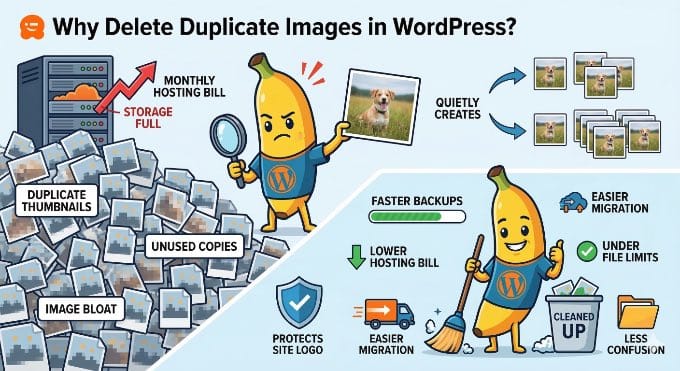
Maggie Cabrera: Yeah, the next one’s a playlist block, which is ramping up, it’s getting the waveform player visualization where Benny has been implementing this open source visualizer instead of creating one that we need to maintain and applied it to the playlist block, which is, I think it’s, I don’t know if it’s going to make it. No, it’s, it’s going to be for 7.1 then.

Birgit Pauli-Haack: Yeah.

Maggie Cabrera: Yeah. And it’s looking really, really nice. I can’t wait to. To have this for themes. I was just looking into the original playlist because I kind of like to do this kind of thing, which is look at all the issues that we’re closing our— and it’s from— it’s, uh, issue 805. Oh wow, 2017. So we’re doing that in 2026, which is great. Honestly, I like it. Yeah. So yeah, and it’s looking so good. I love it. I can’t wait. I have a bunch of friends from the Sevilla community who are podcasters, and I can’t wait to see what they can make with it.

Birgit Pauli-Haack: Yeah, and I’m definitely going to put it also on the Good Mythical Times. Oh yeah, for sure.

Maggie Cabrera: For sure. You let us know if it fails or—

Birgit Pauli-Haack: Oh yeah, of course. I have opinions. I travel. Go for it. Yeah. I also know that, so our team, which is Justin Tadlock, Ryan Welcher, Jonathan Bossinger, Juan Margarito, we are all working on a showcase for a band website. And I know that Justin does the theme for it and he has already built with the playlist block and it looks amazing on those band websites when we have albums and all that. I don’t know when we will release it, but it’s definitely going to be for education of developers to kind of see how interactivity API works, how some of the theme features work with that. And yeah, it’s going to be really cool. Just as a side note there. Yeah, there were a few blocks that hadn’t had a text-align block support added to it, or they had their own implementation. And there was a big push in Gutenberg to make it available for all the blocks that have text in there. To, to do the text align things.

Maggie Cabrera: Yeah. Yeah. Those code quality changes really make a difference on it.

Birgit Pauli-Haack: Yeah. So there were 5 more in 22.7. Uh, 22.6 had 8 blocks that were going in there. So I’m not sure they made it all to 7.0. No, no, they were not.

Maggie Cabrera: We have many blocks. So that’s painstaking work, honestly.

Birgit Pauli-Haack: Yeah. It’s taking work. Yeah. And it comes in when it comes in. So, and then there’s also the previews of style variation transforms. So you can say, okay, I want to transform certain sections into a different style variation. Now there’s a little preview so people are not surprised what’s happening. Yeah. Yeah. People don’t like surprises. If they don’t click with, they don’t know what’s gonna happen.

Maggie Cabrera: Yeah. Now we can also enable style variations. Transforms for blocks that are in content-only mode. If you’re editing a pattern that has an image and you want to change to the variation with around the corners or something, you can do it within the UI of content-only.

Birgit Pauli-Haack: Yeah. Yeah. I saw that yesterday. Yeah. That, that’s, that’s actually pretty cool.

Maggie Cabrera: And there’s another change coming up. Yeah. The block supports, you can define CSS for blocks based on feature selectors. This is kind of like a complicated one that it’s setting up. A lot of flexibility for blocks.

And I’ve been using personally this option, this feature on a change that recently made it that I haven’t talked about it yet here, but I think it will make it also on the next changelog, which is I, we’ve added for the navigation link, the possibility to style the current item. And the reason why this PR by Aaron is, well, this feature in general by Aaron is useful is that, so what this does is basically lets you define a CSS selector that’s specific to a feature. So right now, block.json allows you to, before it used to only allow you to define like a selector for your block, that’s what theme.json would target, but some features need something specific. In the case for the current navigation, we want to target the navigation link only if it has the current menu item class too. So now you can go on block.json and say, when we’re using the feature current, we want this CSS selector to be the one that we’re using. So that is really flexible and allows for so many things that you can do with global styles and blocks.

Birgit Pauli-Haack: Yeah, I think that was for custom blocks. You only could have a selector for the wrapper of the block. But the inner blocks you weren’t able to target without CSS chasing.

Maggie Cabrera: But it’s not only that, like, in the case of the navigation, it’s not about the wrapper only, but also because it’s a very dynamic block that changes depending on the state it’s in. It will change its classes. If you’re visiting a specific page, it will have this current menu item class. So if you can target only that, that’s very useful.

Birgit Pauli-Haack: I think we need some little tutorial about that.

Maggie Cabrera: Yeah, yeah, yeah. I think, well, that will definitely, like the current menu item will definitely have a dev note for 7.1.

Birgit Pauli-Haack: Yeah, absolutely. Yeah. But that’s awesome. Thank you so much for pointing that out.

Bug Fixes

The next one is that the grid block improved visualizer is now responsive. The visualizer’s responsiveness has been approved. I wasn’t quite sure which one was going. The grid block also got a little bit of an improvement for 7.0, but that we already talked about it when, when I was going with Jessica, I think last, last episode. But I really like how the grid block is now. You can define a minimum width of your columns. And then if you, even if it’s a custom one, it kind of will then be responsive and stack the whole thing. On your mobile. So it’s much easier to do. Yeah.

Maggie Cabrera: So strong grid.

Birgit Pauli-Haack: Yeah. Yeah. The grid block gets better and better. And I hope there is some time for some contributors to work on it for the 7.1 and 7.2, because it’s so helpful to have that also in template parts and patterns and all that. So the PHP-only blocks now have boundary attributes, values. In the inspector controls that wasn’t before that. Now you can see it in the— so they can be changed and automatically added to the custom block that is registered with PHP. And with the Gutenberg 22.7, the real-time collaboration is actually enabled by default.

Maggie Cabrera: So it’s getting out of experiment then.

Birgit Pauli-Haack: It was already out of experiment. But it was actually opt-in.

Maggie Cabrera: Before.

Birgit Pauli-Haack: Oh, I see, I see. And now they switched it to opt out.

Maggie Cabrera: Okay.

Birgit Pauli-Haack: The space is the same. You go to the general settings into writing, and then it’s, I think, the third option from the top. You can disable it if you want to, if it gets into your way like it did yesterday at my demo. I disabled it and it was always fine. I’m just repeating it so I can remember to file a bug report and test this again. Yeah. What’s next?

Maggie Cabrera: You can disable multiple collaborators if meta boxes are present.

Birgit Pauli-Haack: Yeah. And it’s not the, that you can, it will disable multiple collaborators when meta boxes are present. You’re right. Because they, it clashes.

Maggie Cabrera: Yeah.

Birgit Pauli-Haack: It clashes because the saving of the meta box and auto saving, they’re not in sync. So you might lose content from the meta boxes. In that, so it’s automatically disabled there.

Experiments

There’s an experiment in Gutenberg. It’s called the Content Guidelines, and it comes through the WordPress AI team. They were exploring Content Guidelines as a Gutenberg experiment, as a dedicated structured place inside WordPress to cover your site’s voice, tone, image, and copy standards. And it works with the REST API and custom post types and has an UI to manage that, but you need to enable it in your experiments page. It also has block-level guidelines and import and export on the vision history. So what it does, it’s not, it isn’t for AI only, but AI, if you have an AI assistant that works with your website, the content guidelines are actually helping that AI to match your tone, to match your your standards, your guidelines, standards, your publishing standards, your pre-publish checklist and all that. But also when an AI comes and goes to your website, then it will know, have more information about your website that’s more in-depth than what it knows from just scrolling it.

Maggie Cabrera: Yeah. Makes sense.

Birgit Pauli-Haack: Yeah. So it supports sitewide categories. Like the site, the copy, the images, and additional, and then the block level stuff. That’s kind of in the changelog of 22.7 as an experiment. And I don’t know where it’s going, but we will see how once it’s tested and more people have to chime in to see if it makes it out of experiments or when it makes, not if, when.

Maggie Cabrera: Yeah. Yeah.

Birgit Pauli-Haack: It’s really interesting to see that. Yeah. Kind of all of a sudden you have a second layer of concern. It’s not only SEO, it’s AEO, and then you have your own assistants kind of go in and do stuff. Yeah.

Maggie Cabrera: It’s important to have default solution for this because WordPress is so extended. There needs to be something that everyone can build on upon. Yeah.

Birgit Pauli-Haack: Yeah, absolutely. That’s actually the, the philosophy of the AI team is to, to build the plumbing.

Maggie Cabrera: Defaults.

Birgit Pauli-Haack: And defaults. So plugins can build on top of it and there is a standard there. So that’s kind of really cool.

Documentation

So when we have a few documentation items that we wanna point out, well, because that’s always a little bit different.

Maggie Cabrera: Always important to keep documentation up to date.

Birgit Pauli-Haack: Absolutely. Yeah.

Maggie Cabrera: Now more than ever.

Birgit Pauli-Haack: Yeah. With all the new things coming in. So there is a theme.json schema for the icon block. And then the documentation for the content role and the list view block supports. So custom blocks as well as theme can add the content role to things, patterns, template parts, templates.

Maggie Cabrera: Yeah.

Birgit Pauli-Haack: It also has an improved parameter documentation for the icon block and updated README for data views, data forms, and the field API.

Maggie Cabrera: Yeah, with all those changes.

Birgit Pauli-Haack: All the changes.

Maggie Cabrera: Like the meme, all the changes.

Birgit Pauli-Haack: All the changes. All the changes. Yeah. We like changes. Changes are hard, but we like them. Yeah. So I think that’s the essence of what’s in the changelog for Gutenberg 22.7.

What’s in Active Development or Discussed

I have just one item that I wanted to touch base on with Maggie today, with you about what’s in development and discuss. Touched on some of it, but the tabs block unfortunately didn’t make it in 7.0. It’s on its way to get into 7.1 and it was so close.

Maggie Cabrera: It really was. Yeah. It was a little bit of a pity that it didn’t make it, but I mean, so the thing was another contributor, I think it was Aki, was reviewing the block when we were trying to stabilize it and he raised important concerns and we sat down and looked at it and thought, yeah, I think this, we think the structure of the block is not correct right now. And this is really important to get right because once it’s there, it just needs to stay. And this would have been a mess if we had to backtrack that. So yeah, that, those concerns have been mostly addressed in a PR. I think I have the link for you here.

You can share it later. And there’s a bunch of follow-ups coming after that, which means that the tabs is not only going to be like in a really good state, but also it’s going to come with more things. One of those things is what I was talking before. That I was working on the current menu item, the ability of adding the, what we’re calling states for blocks or elements. In the case of the current menu item, like the state of where a nav link is the current one that we’re visiting. And in the case of the tabs, which tab you have currently open, we will be able to assign a tab as current and be able to style it as such. First via theme.json and then hopefully also for 7.1 with, uh, our new UI for states.

Birgit Pauli-Haack: Awesome. Yeah.

Maggie Cabrera: Really excited for all of that. Everything’s linked. Everything works together.

Birgit Pauli-Haack: Yeah, it has to. Yeah. I think the concern was that it didn’t follow the usual how other blocks were built.

Maggie Cabrera: Yeah.

Birgit Pauli-Haack: It would kind of confuse not only contributors, but also those who kind of want to extend it. Seth Rubenstein worked on it quite a bit and he actually had to bow out just before 7.0 for his own priorities. And I’m glad that you picked it up though. Sarah picked it up.

Maggie Cabrera: It was Sarah mainly. I was just reviewing and—

Birgit Pauli-Haack: Sarah, you said?

Maggie Cabrera: Yeah.

I was reviewing and supporting her, but it’s been Sarah’s work since she picked it up.

Birgit Pauli-Haack: So that’s coming and we definitely will talk about it some more on other releases and also have a call for testing. It won’t be an official one, but I will make it to test it. Yeah. So, but now go back to testing 7.0, what’s coming to a WordPress instance near you in a month, roughly in a month, April 9th. And it will be released. There will be a release panel at WordCamp Asia Contributor Day. So quite a few from the release squad are going to Mumbai. To be on that panel, and I will see everybody there. I think it’s after my workshop on theme development is actually after lunch, so we were all gonna sleep in my workshop. I’m really happy.

Maggie Cabrera: Yeah, catch up with that when you have it, when you, when you’ve done it, because I’m not going to WordCamp Asia, but I want to see your workshop.

Birgit Pauli-Haack: All right. Okay. Yeah. Well, we’ll see. It’s the first workshop that I do on theme development, so it’s going to be maybe a hit and miss. We’ll see.

Maggie Cabrera: Sure, you’ll do fine.

Birgit Pauli-Haack: As always, dear listeners, this is the end and the show notes will be published on gutenbergtimes.com/podcast. This is episode 128, 128. And if you have questions and suggestions or news you want us to include, send them to changelog@gutenbergtimes.com. That’s changelog@gutenbergtimes.com. And Maggie Cabrera, thank you so much for being here. And being such a great resource and talk about all the good things that you work on.

Maggie Cabrera: Thank you for having me.

Birgit Pauli-Haack: Absolutely. And thanks for listening and goodbye for now. Bye-bye.

Maggie Cabrera: Bye.

Gutenberg Times: My WordPress, WordPress 7.0, Gutenberg 22.7, and AI Experiments — Weekend Edition 361

Hi,

This week, we saw many updates in WordPress Core with two Betas and three security releases. Your auto-update email folder got plenty of traffic if you are managing more than one website 🤗 The next step for the security team is to backport the 6.9.4 fixes to older version for WordPress, all the way back to WordPress 4.7.. It’s a huge job and it needs to be diligently executed.

Be well and hope you can enjoy Spring or Fall colors.

Yours, 💕
Birgit

Developing Gutenberg and WordPress

WordPress 6.9.2, led by John Blackbourn, is a security-only release you’ll want to apply immediately. It patches ten vulnerabilities: a blind SSRF, a PoP-chain weakness in the HTML API and Block Registry, regex DoS in numeric character references, stored XSS in nav menus and via the data-wp-bind directive, an AJAX authorization bypass, a PclZip path traversal, and an XXE in the bundled getID3 library—now also patched upstream by James Heinrich.


WordPress 7.0 Beta 5 is available for testing, packing over 101 fixes since Beta 3. The headline new feature is a Command Palette shortcut in the Omnibar — logged-in editors will spot a ⌘K / Ctrl+K symbol in the admin bar, giving you instant access to navigation and customization tools from anywhere on the site. The final release remains scheduled for April 9, 2026.


Ben Dwyer recaps what’s new in Gutenberg 22.7, a feature-packed release. You’ll find a new experimental Connectors screen under Settings, letting you manage AI providers like OpenAI with extension hooks for plugins. Real-time collaboration is now enabled by default, style variation transforms show live previews, the Grid block visualizer is more responsive, and the Playlist block gains a WaveForm Player.


Maggie Cabrera and I sat down to discuss the latest Gutenberg release and the Dev notes for WordPress 7.0. It’s been a while since we chatted and it was a great conversation. As always, the episode will drop into your favorite podcast app over the weekend. Stay tuned.


Anne McCarthy has issued a call for volunteers to build the Twenty Twenty-Seven default theme, with Henrique Iamarino confirmed as lead designer. Targeting the WordPress 7.2 release in early December, the team is getting started early to allow room for iteration. If you want to contribute to development or testing, leave a comment on the post by Friday, March 27th — the community response has already been enthusiastic.

Draft highlight grid for WordPress 7.0

This month’s What’s New for Developers (March 2026) is your essential pre-launch briefing as WordPress 7.0 approaches RC1 on March 19. The big headline is Real-Time Collaboration, now built on HTTP polling with Yjs and CRDT data stored in post_meta. You’ll also find AI provider packages for OpenAI, Google, and Anthropic landing in the Plugin Directory, plus visual in-editor revision tracking, a new Icon block, Content-Only pattern editing by default, and phpMyAdmin support in wp-env’s Playground runtime.


Maggie Cabrera outlines what’s new with pseudo-element support for blocks and their variations in theme.json in WordPress 7.0. You can now define :hover, :focus, :focus-visible, and :active states directly on blocks and their style variations — no custom CSS needed. An “Outline” button variation, for instance, can have its own distinct hover behavior. No Global Styles UI yet; that work continues separately.


Gopal Krishnan outlines what plugin and theme developers need to know about real-time collaboration in the block editor in WordPress 7.0, powered by Yjs. Collaboration is disabled when classic meta boxes are present, so you’ll want to migrate those to registered post meta with show_in_rest. The new sync.providers filter lets you swap the default HTTP polling transport for WebSockets or WebRTC. Avoid local React state for shared data — always derive values from the WordPress data store.

🎙 The latest episode is Gutenberg Changelog #127 – WordPress 7.0 Beta and Gutenberg 22.6 with special guest Jessica Lyschik, senior developer at Greyd

Jessica Lyschik and Birgit Pauli-Haack recording Gutenberg changelog episode number 127

Anne McCarthy shared a candid look at three Notes features for WordPress that didn’t quite make the 7.0 cut — show/hide notes on the canvas, filter options in the Notes panel, and compact notes. All built with Claude Code as part of her “Learn AI deeply” effort. She’s openly working through open questions, including whether “Open” or “Unresolved” is the clearer label, and whether a resizable sidebar should replace the compact toggle entirely. Chime in if you are interested and have an opinion.

My WordPress

Brandon Payton announced my.WordPress.net, a browser-based WordPress that requires no sign-up, no hosting, and no domain — just open it and start creating. Built on WordPress Playground, your site lives privately in your browser, persists across visits, and stays entirely yours. An App Catalog offers one-click installs for a personal CRM, RSS reader via the Friends plugin, and an AI workspace that can modify plugins on your behalf. As Alex Kirk puts it, this is WordPress democratizing digital sovereignty.


Where the official announcement focused on the product itself, Matt Mullenweg‘s WordPress Everywhere is the strategic vision behind it. He zooms out to explain what’s coming next — peer-to-peer sync, version control integration, and cloud publishing — and frames Playground containers as composable, atomic units you can roll back entirely. Mullenweg believes this shifts WordPress from millions of installs to billions, with AI making open source more powerful, not less relevant.


Sarah Perez covers WordPress’s new browser-based workspace, my.WordPress.net, for TechCrunch.

Emma Roth reported about it for The Verge: WordPress launches an in-browser website creator.


Ben Werdmuller marvels at your browser becoming your WordPress — a genuine innovation announced by Brandon Payton. Built on WordPress Playground and powered by WASM, my.WordPress.net installs a full WordPress instance directly in your browser: no sign-up, no hosting, nothing between you and a running site. Werdmuller wonders about cross-device syncing and sees broader implications — to-do lists, CRMs, source management — as a glimpse of what private, browser-based personal apps could become.


If you get a chance to try my.WordPress.net in its current early state, go in with the right expectations: this is a proof of concept, a rough but genuinely exciting experiment. The App Catalog reframes plugin discovery in a way that just feels right, and the idea of a private personal space — where outside research meets things you want to keep to yourself — is compelling. Give it a few months, more apps, and a designer’s touch.

Just before the official announcement of My WordPress, Ray Morey interviewed Adam Zieliński’ on his vision for Playground in 2026 and also recounts the history of WordPress Playground starting in 2022.

Plugins, Themes, and Tools for #nocode site builders and owners

On the WooCommerce Developer Blog, Brian Coords invites you to Building Ecommerce Community: Meetups, Networks, and Real-World WooCommerce, a free 60-minute panel on March 31, 2026 (17:00–18:00 UTC). Coords brings together Amber Hinds (Equalize Digital), Mary Hubbard (WordPress Executive Director), and Raquel Manriquez (PressConf) for an honest conversation about building community, finding collaborators, and getting real value from events — whether you’re an agency, freelancer, or developer who’s never quite felt at home in a crowd.

WooCommerce Community building panel March 31, 2026

Mike McAlister has expanded Ollie into WooCommerce territory, adding dedicated shop templates, product grid patterns, custom WooCommerce blocks, and a guided setup wizard — all built natively for full site editing. You can design and customize your store, product pages, cart, and checkout entirely inside the WordPress site editor. One user reported a 170% year-over-year sales increase after rebuilding their client’s store with Ollie.

Rae Morey, The Repository also reported on it in Ollie Moves Into Ecommerce With Full WooCommerce Support


Derek Hanson, Technical Account Manager at Automattic, shares 10 field-tested tips for building custom WordPress blocks with Telex AI, drawn from real agency work on his team. You’ll learn practical techniques like drafting prompts in Claude before opening Telex, using post-it sketches as visual references, remixing projects as version control checkpoints, and knowing when a block has outgrown the tool and needs a developer to finish it properly.


In his latest video, Wes Theron shows you how to speed up your designs with WordPress patterns. You will learn how to quickly build and customize professional WordPress layouts using block patterns. Theron shows you how to insert, modify, and create patterns to design pages effortlessly.

Theme Development for Full Site Editing and Blocks

The Create Block Theme plugin v2.9.0 brings a handful of focused improvements to your theme-building workflow.

  • fixed localization for Cover block background images and the Read More block’s content attribute.
  • added basic end-to-end tests and an AGENTS.md file,
  • polished the sidebar with a Card component,
  • consolidated redundant APIs,
  • migrated to husky v9, and bumped the minimum WordPress requirement to 6.8.

“Keeping up with Gutenberg – Index 2025”
A chronological list of the WordPress Make Blog posts from various teams involved in Gutenberg development: Design, Theme Review Team, Core Editor, Core JS, Core CSS, Test, and Meta team from Jan. 2024 on. Updated by yours truly. 

The previous years are also available:
2020 | 2021 | 2022 | 2023 | 2024

Building Blocks and Tools for the Block editor.

In this week’s livestream, Ryan Welcher and Troy Chaplin teamed up on this episode of Talk Devy To Me to walk you through “Veils of Fate,” a fully functional Choose Your Own Adventure game Chaplin built entirely with the WordPress Interactivity API. You’ll see how he delivers instant feedback and seamless state changes across game choices — no page reloads, no JavaScript framework. A creative, boundary-pushing demonstration of what the Interactivity API can do beyond typical block development use cases.

Wojtek Naruniec writes about two new debugging tools now available in WordPress Studio: Xdebug support and a debug log toggle. Xdebug lets you set breakpoints and step through code line-by-line from your editor on port 9003, no system-level installation is needed. The debug log toggle sets WP_DEBUG and WP_DEBUG_LOG automatically and adds a direct “Open log file” link in Settings. A bonus tip: point your AI agent (Claude Code, Cursor, Codex) at wp-content/debug.log to interpret errors hands-free.

AI and WordPress

Jeffrey Paul recaps what’s new in AI Experiments 0.4.0 for the WordPress AI Team. This release, shaped by 14 contributors, introduces prompt-based image generation in the editor and Media Library, along with a Generate Review Notes experiment for accessibility, readability, grammar, and SEO suggestions.

In another post, Paul outlines what’s new in AI Experiments 0.5.0, a focused release aligning with WordPress 7.0. It removes AI client dependencies, using the WP AI Client in core instead, while previous credentials migrate to a new Connectors screen. The plugin is available in the repository.

Ray Morey reported on both releases for The Repository: AI Experiments Plugin Gets Two Updates in a Week, With WordPress 7.0 Now the Focus


Elliott Richmond put wordpress-agent-skills repo and Automattic’s Claude Cowork plugin through its paces and came away impressed. Describe your site, pick from three AI-generated design directions, and a complete block theme — theme.json, templates, patterns, the lot — deploys straight to WordPress Studio in minutes. The generated code follows solid conventions and is yours to iterate on. Setup requires MCP configuration and Studio CLI, so developers will find it straightforward; everyone else faces a steeper climb. Token usage on Opus is substantial.

Need a plugin .zip from Gutenberg’s master branch?
Gutenberg Times provides daily build for testing and review.

Now also available via WordPress Playground. There is no need for a test site locally or on a server. Have you been using it? Email me with your experience.


Questions? Suggestions? Ideas?
Don’t hesitate to send them via email or
send me a message on WordPress Slack or Twitter @bph.


For questions to be answered on the Gutenberg Changelog,
send them to changelog@gutenbergtimes.com


Featured Image: